

padbridge v2.0.0 by sub0x00001
Turns USB controllers and receivers into extra DualSense pads, up to four, next to your own DualSense
Install on your PS5
Payload: start elfldr 0.25 or newer on the PS5 first. It listens on port 9021. Then press Send to PS5 beside the payload you want under Files, on a computer or phone on the same network. elfldr downloads the payload and runs it, so the PS5 needs to be online.
Files
| File | Size | SHA-256 | |
|---|---|---|---|
| octet-2.0.0.elf | 172 KB | ab25b6e9…73cd | Send to PS5 Download |
| octet-probe.elf | 109 KB | bcf60754…d7fc | Send to PS5 Download |
Screenshots
About padbridge
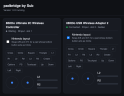
Each controller on a USB receiver or cable shows up to the console and games as a DualSense. The developer covers three kinds: 8BitDo's 2C Wireless controller on its 2.4G dongle, nearly any Bluetooth controller paired to an 8BitDo USB Wireless Adapter 2 (DualSense, DualShock 4, Xbox, Switch Pro and others), and wired Xbox 360 style XInput pads. The console's own Bluetooth is left alone, so your DualSense stays paired.
Switch the controller on and press Home or PS, and the console asks who is using it. Pick a second user for a second player. The choice is remembered per controller.
A settings page on port 8090 shows each controller live and has a Nintendo layout switch that swaps A/B and X/Y. It has no password, so anyone on your network can open it.
PS4 games rumble on some setups. PS5 games don't, and there's no light bar, motion or audio yet. The developer lists firmware 13.60. Up to version 1.1.0 it was called pad2c.
Release notes
v2.0.0 · octet 2.0.0 · Nov 13, 2026
padbridge is now octet. Same payload, same controllers, a name of its own. Tested on a PS5 Slim (CFI-2114), firmware 13.60. See the README for compatibility and the settings page.
Files
octet-2.0.0.elf: the payload. Send it to your payload loader or add it to Payload Manager's autoload.octet-probe.elf: an optional read-only diagnostic that dumps the descriptors and reports of USB devices plugged into the console.
Check a download against its .sha256 file.
Upgrading from padbridge (or pad2c)
- On its first start octet asks a running padbridge or pad2c to stop and moves
/data/padbridge(or/data/pad2c) to/data/octet, remembered users, settings and log included. - In Payload Manager's autoload list, replace
padbridge-<version>.elfwithoctet-2.0.0.elf. - Notifications now read "octet by Sub"; the probe writes
/data/octet/probe.log.
Changes since 1.3.1
- Renamed from padbridge to octet: payloads, notifications, settings page and files in
/data/octet. - README leads with the 8BitDo Ultimate 2C and the 8BitDo USB Wireless Adapter 2; wired XInput controllers and the Switch Pro Controller stay supported.
Everything from 1.3.1 is unchanged: rumble in PS4 games, the Switch Pro Controller and the adapter's Switch mode, View + Menu as the touchpad, rest mode.