

SysMon v0.3.5 by Just-a-Spider
Shows your PC's CPU, GPU and RAM readings on the 3DS over Wi-Fi, and works as a macro pad and gamepad for the PC
Install on your 3DS
Method 1Scan the QR code
With NSA or FBI (Remote Install › Scan QR Code), or 3dsDL (Scan QR Code).
Method 2Send it to your 3DS
With NSA 0.9.12 or newer open, or 3dsDL on Receive, on the same Wi-Fi, press:
Send to your 3DS Not working?
Other ways to install
From your SD card: copy sysmon-3ds.3dsx into /3ds/ and start it from the Homebrew Launcher.
Files
| File | Size | SHA-256 | |
|---|---|---|---|
| sysmon-3ds.3dsx | 4.3 MB | 4c80aa9e…ba7d | Download |
| sysmon-3ds.cia | 4.4 MB | 9ec7eaa4…85e2 | Download |
Screenshots


About SysMon
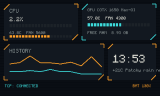
The top screen shows what your PC is doing: CPU load, CPU and GPU temperature and fan speed, free RAM, a graph of recent temperatures, the time and the weather. The 3DS battery level and the connection state sit in the footer. Press Select to pause or reconnect.
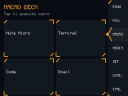
The bottom screen has touch tabs. POMO is a Pomodoro timer. LEVEL sets the PC's volume and screen brightness. KILL lists the processes using the most CPU and RAM and ends the one you pick. MACRO has eight buttons for shell commands, key combos, links or text that you define on the PC. MEDIA controls the PC's media player. CTRL turns the 3DS into a game controller for the PC. SET has colour themes and profiles for more than one PC.
You need the sysmon-server program running on a Linux or Windows PC on the same network. It's in the project's releases on GitHub. The gamepad tab uses uinput on Linux and needs the ViGEmBus driver on Windows. The server uses TCP ports 7341 and 7342 and UDP port 7339, so open them in the PC's firewall.
There's also an experimental screen streaming build that mirrors the PC monitor. The author doesn't recommend it and says the results on an Old 3DS were awful.
Release notes
v0.3.5 · Nov 7, 2026
What's Changed
- Release v0.3.5: AMD telemetry, LHM bridge, HUD N/A, and 3DS banner audio fix by @Just-a-Spider in https://github.com/Just-a-Spider/SysMon/pull/6
Full Changelog: https://github.com/Just-a-Spider/SysMon/compare/v0.3.4...v0.3.5