

Luma3DS v13.5 by LumaTeam
Custom firmware for the 3DS, with the Rosalina menu, game plugins and LayeredFS
Install on your 3DS
Method 1Scan the QR code
With 3dsDL (Scan QR Code). Then open the .zip in 3dsDL's Files and extract it where the release notes say.
Method 2Send it to your 3DS
Open 3dsDL › Receive on the same Wi-Fi, then press:
Send to 3dsDL Not working?
Other ways to install
Send can't find your 3DS? Type the address 3dsDL shows on Receive, then press Send.
Send to 3dsDL
Files
| File | Size | SHA-256 | |
|---|---|---|---|
| Luma3DSv13.5.zip | 532 KB | c2b70114…e2a3 | Download |
Screenshots
About Luma3DS
Patches and replaces big parts of the 3DS system software, with homebrew support built in. It needs boot9strap installed first. The zip goes in the root of the SD card, replacing files and merging folders, and it includes the Homebrew Launcher.
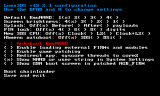
Hold Select while the console boots for the configuration menu. Settings are saved in /luma/config.ini. Hold Start for the chainloader, which lists .firm payloads in /luma/payloads. A payload named x_test.firm loads straight away if you hold X at boot.
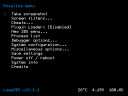
L+Down+Select opens Rosalina, an overlay menu that works in games. From there you can take screenshots, turn on a blue light filter or other screen filters, use cheats, set the clock over the internet and redirect input from other devices. Most Rosalina settings only stay if you pick "Save settings".
For modding there are 3GX game plugins, per-game language overrides and LayeredFS for swapping game assets. Developers get a GDB stub on ports 4000 to 4002.
Hold Select while the console boots for the configuration menu. Settings are saved in /luma/config.ini. Hold Start for the chainloader, which lists .firm payloads in /luma/payloads. A payload named x_test.firm loads straight away if you hold X at boot.
L+Down+Select opens Rosalina, an overlay menu that works in games. From there you can take screenshots, turn on a blue light filter or other screen filters, use cheats, set the clock over the internet and redirect input from other devices. Most Rosalina settings only stay if you pick "Save settings".
For modding there are 3GX game plugins, per-game language overrides and LayeredFS for swapping game assets. Developers get a GDB stub on ports 4000 to 4002.
Release notes
v13.5 · Nov 2, 2026
This release of Luma3DS brings many quality-of-life improvements and lays the groundwork for future releases.
First, several settings have been moved from config.ini to unused MCU registers. These settings can now be changed directly through Rosalina and are saved automatically. Some of them are new:
- "Enhance top/bottom screen colors" in the Screen Filters menu
- Audio routing (automatic, force speakers, force headphones)
- Volume slider override and left/right audio balance
- LED master brightness override (0% to 100%)
- Celsius/Fahrenheit toggle for battery temperature
Now, the rest of the changelog:
- Rosalina: significant improvements to screen filters:
- Add support for per-channel (red, green, blue) gamma and contrast adjustments, allowing for more precise screen color calibration
- By continuity in gamma, we now define $0^0 = 0$, as this provides a useful result instead of turning the entire screen white
- Greatly optimize color correction LUT generation (from ~700 µs to ~75 µs), and synchronize LUT writes with VBlank to prevent graphical glitches
- Remove the "brightness" adjustment from advanced screen filter settings as it prevents optimization
- Rosalina: rework and extend several options in the "System configuration" menu
- Rework "Control volume" into "Set volume slider override...", adding stereo balance control (left/right, for I2S1 audio)
- The UI for this has been reworked
- Audio balance can only apply if the override is enabled, _and does not apply to applets_ (I2S2)
- Add "Set audio routing..." to force audio output through speakers or headphones, or leave it on automatic
- Replace "Toggle LEDs" with "Set LED master brightness override...", allowing brightness adjustment from 0% to 100%
- The red POWER LED is not dimmable. While it can be disabled, we deliberately leave it on even at 0% to allow the user to be notified of the battery level being low
- The "charging" LED is not dimmable
- Setting LED brightness to 0% also keeps the LEDs off during sleep, except for the red POWER LED and the charging LED. Otherwise, the usual "breathing" pattern (alternating between 4% and 100% brightness) is used
- Rosalina: display the current date and time in the top-right corner of the menu when the IP address isn't being displayed
- Rosalina: add an option to display the battery temperature in Fahrenheit instead of Celsius
- Loader: improve game and sysmodule patching:
- Add support for UPS patches (
code.ups), in addition to IPS and BPS patches. Note that UPS CRC checks are currently skipped - Massively speed up IPS patch loading, especially for patches containing large numbers of small records (from several minutes to less than 50 ms in some cases)
- Improve IPS handling of file size changes, zero-filled gaps, and the optional size field after the EOF marker
- Properly propagate the resulting code size between BPS, IPS and UPS patches, allowing multiple patches to be applied together (the application order is deliberately unspecified and should not be relied upon)
- Fix BPS patches failing on sysmodules due to excessive temporary memory allocation
- Improve 3DS homebrew autoboot:
- Use the HOME Menu reboot mechanism by default, instead of directly launching the configured title through NS
- This fixes issues with the HOME/POWER buttons when using non-default application memory layouts, and allows normal booting if the configured title cannot be found
- Note: Due to a bug in older versions of libctru, using memory modes that provide more RAM to applications (such as Dev1) requires rebuilding homebrew applications with libctru v2.7.1 or later. The Homebrew Menu (
boot.3dsx) included in this release archive has already been built with a compatible version - The previous behavior can still be enabled through
autoboot_3ds_use_ns = 1inconfig.ini - LayeredFS: Fix patching of games that do not contain the
fsUnmountArchivesymbol, such as Metroid: Samus Returns (by @R-YaTian, #2245) - Plugin loader: Fix issues with plugin cleanup on process termination, which could leave plugin memory mapped and prevent subsequent applications from starting
- This release archive ships with an updated
cacert.pemwhich does not contain the compromised eMudhra and Sectigo certificates.cacert.pemis used by homebrew that uses cURL - Further improvements to overall system stability and other minor adjustments have been made to enhance the user experience