

ctr64 v0.9.2 by gl91306
N64 emulator built on Mupen64Plus-Next and GLideN64, with a new graphics backend for the 3DS GPU and the ARM recompiler
Install on your 3DS
Method 1Scan the QR code
With NSA or FBI (Remote Install › Scan QR Code), or 3dsDL (Scan QR Code).
Method 2Send it to your 3DS
With NSA 0.9.12 or newer open, or 3dsDL on Receive, on the same Wi-Fi, press:
Send to your 3DS Not working?
Other ways to install
Files
| File | Size | SHA-256 | |
|---|---|---|---|
| ctr64.cia | 2.3 MB | 2e33bb94…d33e | Download |
| ctr64-release.zip | 4.7 MB | 5016cacf…54c2 | Download |
| ctr64_lessram.cia | 2.3 MB | 7ef8f72a…7574 | Download |
| ctr64_o3ds_test.cia | 2.3 MB | c68bafbf…8797 | Download |
| ctr64_o3ds_backup.cia | 2.3 MB | 4a789a43…fea7 | Download |
| ctr64_o3ds_test2.cia | 2.3 MB | 514ef3f6…f328 | Download |
Screenshots
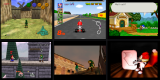
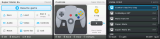

About ctr64
gl91306 ported Mupen64Plus-Next and GLideN64 to the 3DS and wrote a graphics backend straight on the PICA200 GPU. On a New 3DS the CPU emulation, video and audio run on separate cores, and the author says several games run at or close to full speed there, with optional 2x anti-aliasing. An Old 3DS works but is slower: games over 16 MB are read from the SD card while they play, with a progress bar on the first start and short pauses in new areas. The author recommends the CIA on an Old 3DS.
Your own game files in .z64, .n64 or .v64 format go in sdmc:/3ds/ctr64/roms/. The release zip also has a 3ds folder for the root of the SD card, with lists of compiled code for some games that make their first minutes smoother. In-game saves use the .srm format of RetroArch's Mupen64Plus-Next, so they move both ways, and there are ten save state slots. Sound needs a DSP firmware dump, and the recompiler needs Luma3DS.
Select or a tap on the bottom screen pauses and opens the menu: save states, audio, video (frameskip, screen shape, frame buffer emulation, dark mode) and controls, where you map each N64 button on a picture of the controller. The author calls it a beta, tried mostly in the Azahar emulator and on a New 3DS.
- Circle Pad: control stick
- C-Stick, X and Y (New 3DS) or D-Pad (Old 3DS): C buttons
- A / B: A / B
- L: Z
- ZL / R (New 3DS) or X / R (Old 3DS): L / R
- Start: Start
Release notes
v0.9.2 · ctr64 0.9.2 (beta) · Nov 22, 2026
ctr64 0.9.2
new stuff!
- Box art: the top screen of the game list shows each game's box art in a carousel. It downloads over Wi-Fi from libretro-thumbnails the first time and is kept on the SD card. Games without art get a title card
- Bottom screen in game (Video settings): Menu, Blank, or Off (backlight off). Any tap still opens the menu
- Per-game controls: press START on the controls page to save the controls for just that game (START again goes back to the shared ones)
- One N64 button on two 3DS buttons: hold both buttons when setting it (for example shield on L and ZL)
- Swap the D-Pad and the Circle Pad: select the D-Pad on the controls page and press A (good for racing games)
- Game list: D-Pad left/right jumps to the first game of the previous/next letter (the Circle Pad just moves one game in any direction)
- The game speed text turns yellow/red when a game runs below its normal frame rate
- New 3DS: 64 MB games like Conker now load fully into memory (CIA), so no more SD card hitches
- Old 3DS: should start from the HOME Menu now (the HOME Menu itself crashed before ctr64 started; tested in Azahar's Old 3DS mode, reports welcome)
faster stuff!
- Much faster loading once ctr64 is open: the game list shows about 2 seconds after ctr64 starts, and a game's first frame shows about 1 second after the game is read instead of about 8
- Gauntlet Legends gameplay about 1.5x faster
- 1080 Snowboarding full speed (was about 50%) and faster interrupt-heavy games in general
- Wave Race 64 full speed in races (was about 70%)
- Rat Attack full speed (was about 20%)
- Yoshi's Story full speed while moving
- Mario Golf full speed with antialiasing
- Mario Tennis intro and menus full speed (were about 50%)
- Star Wars Episode I: Racer name entry full speed (was about 15%)
- Smoother audio when Paper Mario changes rooms
fixes to stuff!
- Freezes and crashes: Hydro Thunder (mid-race freeze), Mario Golf (crash entering a course and the freeze after a few shots), Rayman 2 (freeze after ~5 minutes and after picking a save slot), Donald Duck: Goin' Quackers (froze after "New game", audio fixed too), Blast Corps (intro freeze), Iggy's Reckin' Balls (crashes on the logo and a freeze at the main menu), S.C.A.R.S. (hang), Jet Force Gemini (black screen at the title), Gauntlet Legends (black screen)
- Yoshi's Story: backgrounds and the big foreground tree draw right
- Blast Corps: no more black squares or missing patches on the ground
- Donkey Kong 64: the DK Rap intro draws right (was a red wall)
- Paper Mario TTYD64 hack: characters are no longer white
- Conker's Bad Fur Day: Conker's shadow shows on the ground
- Mario Tennis: scene fades cover the whole screen with antialiasing
- Mario Golf: the shot transition shows the spinning picture again
- Banjo-Kazooie: the intro's jigsaw pieces show the picture again
- Rocket: Robot on Wheels: no black screen after loading a save state
- Star Fox 64: no garbage strips at the screen edges (antialiasing is off for this game for now)
- V-Rally Edition 99 boots now
- Save states taken while a frame is still being drawn now load correctly
- SELECT in the game list no longer opens the GPU test
- ROM hacks that kept the original game's name (like TTYD64) are listed by their file name with a "hack" tag instead of showing up as the original game
- Menu text and the button icons were cut off by a pixel on the right and bottom on real hardware, fixed
Opening and closing takes longer now: about 10-20 seconds each way. On New 3DS the cia asks for the 178 MB memory mode (so 64 MB games like Conker load fully into memory so no more SD card loading) and the 3DS has to restart its system to switch memory modes (once when ctr64 opens and once when it goes back to the HOME Menu). I decided to keep it this way cuz i figured people would be fine with waiting 10 more seconds to have more performance.
Known issues: Mario Tennis matches are slow with antialiasing on and its VS screen is slow and player shadows can still flicker. DK64 runs at a lower frame rate than it should (the camera looks jumpy and kinda cuts every few frames). Iggy's Reckin' Balls stutters in the intro and menus (similar thing to donkey kong). Goemon's diary screen is slow. Full list in [COMPATIBILITY.md](ctr64/COMPATIBILITY.md).
QR install: in FBI, go to Remote Install > Scan QR Code and scan this. It always installs the newest ctr64.cia, so you can use it to update too. Ur games still go in sdmc:/3ds/ctr64/roms/, and like the cia below it doesnt come with the prebuilt compile list, so copy the 3ds folder from the zip too if u want popular games faster on first run.
Install: download ctr64-release.zip, install ctr64.cia with FBI
(or copy ctr64.3dsx to sdmc:/3ds/), copy the 3ds folder to the SD card root and put your
games in sdmc:/3ds/ctr64/roms/. Needs custom firmware (Luma3DS); sound needssdmc:/3ds/dspfirm.cdc. Details in the README.
The cia is also attached here for those who just want to quickly install, but it doesnt come with the prebuilt compile list for the most popular games, so they may be slower on first run.
Both Old and New 3DS reports are very welcome, please make a new issue
which game, how fast, and sdmc:/3ds/ctr64/core.log and sdmc:/3ds/ctr64/crash.txt (if exists) if something goes wrong (with profiler set to detailed). A savestate from right before the issue or during the issue would also be super helpful as some parts of some games take a while to get to.
Some people had some problems with the extra ram mode, so I attached a cia that uses the 124 mb ram mode and additional logging to mabye fix it for the next release.
The o3ds test cia is for if ur on 3ds and the other cias got stuck on a black screen