

CalculaThreeDS v0.2 by LiquidFenrir
Scientific calculator with a touch keyboard that shows fractions, powers and roots properly
Install on your 3DS
Method 1Scan the QR code
With 3dsDL (Scan QR Code). Save it to sdmc:/3ds/.
Method 2Send it to your 3DS
Open 3dsDL › Receive on the same Wi-Fi, then press:
Send to 3dsDL Not working?
Other ways to install
From your SD card: copy CalculaThreeDS.3dsx into /3ds/ and start it from the Homebrew Launcher.
Send can't find your 3DS? Type the address 3dsDL shows on Receive, then press Send.
Send to 3dsDL
Files
| File | Size | SHA-256 | |
|---|---|---|---|
| CalculaThreeDS.3dsx | 324 KB | 7f9b8011…924f | Download |
Screenshots
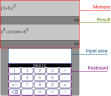
About CalculaThreeDS
Type on the touch keyboard and the bottom screen lays out what you wrote as it would look on paper, with fractions, exponents and square roots drawn at any size. The top screen keeps your last 12 calculations, and you can copy any of them back down.
The keyboard has three panels: digits and operators, functions (put the brackets in after the name), and ten variables you can assign with the arrow sign anywhere in a calculation. The D-Pad or a tap moves the cursor, B or the delete key removes, and A or the equals key works it out.
Written in C++17 by LiquidFenrir.
The keyboard has three panels: digits and operators, functions (put the brackets in after the name), and ten variables you can assign with the arrow sign anywhere in a calculation. The D-Pad or a tap moves the cursor, B or the delete key removes, and A or the equals key works it out.
Written in C++17 by LiquidFenrir.
Release notes
v0.2 · Complex number time! · Jan 10, 2021
Added complex numbers and the conjugate function to work with them
Added implicit multiplications
image
As before, please report bugs you find if they can be reproduced, with an explanation :)