

3DSoundboard v1.0 by Sunrase
Turns the 3DS into a soundboard for your own WAV files
Install on your 3DS
Method 1Scan the QR code
With FBI (Remote Install › Scan QR Code) or 3dsDL (Scan QR Code). Either one installs it.
Method 2Send it to your 3DS
Open 3dsDL › Receive on the same Wi-Fi, then press:
Send to 3dsDL Not working?
Other ways to install
From your SD card: copy 3DSoundboard.3dsx into /3ds/ and start it from the Homebrew Launcher.
Send can't find your 3DS? Type the address 3dsDL shows on Receive, then press Send.
Send to 3dsDL
Files
| File | Size | SHA-256 | |
|---|---|---|---|
| 3DSoundboard.3dsx | 702 KB | 2ec16f3d…903d | Download |
| 3DSoundboard.cia | 1008 KB | c3a7aac0…ea91 | Download |
Screenshots


About 3DSoundboard
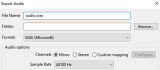
Sounds go in /3ds/3DSoundboard on the SD card. They have to be WAV files, 44100 Hz and mono. It reads up to 64 of them, and the order can't be changed.
You'll need a DSP firmware dump before it makes any noise. In Rosalina (usually L + Down + Select), go to Miscellaneous options and pick Dump DSP firmware.
You'll need a DSP firmware dump before it makes any noise. In Rosalina (usually L + Down + Select), go to Miscellaneous options and pick Dump DSP firmware.
Release notes
v1.0 · 3DSoundboard · Apr 30, 2025
Initial release of 3DSoundboard