

3DS-FileBrowser v1.0.0 by ZIXT233
Manage the SD card from a phone or PC browser while the 3DS runs a small web server
Install on your 3DS
Method 1Scan the QR code
With FBI (Remote Install › Scan QR Code) or 3dsDL (Scan QR Code). Either one installs it.
Method 2Send it to your 3DS
Open 3dsDL › Receive on the same Wi-Fi, then press:
Send to 3dsDL Not working?
Other ways to install
From your SD card: copy 3ds-filebrowser.3dsx into /3ds/ and start it from the Homebrew Launcher.
Send can't find your 3DS? Type the address 3dsDL shows on Receive, then press Send.
Send to 3dsDL
Files
| File | Size | SHA-256 | |
|---|---|---|---|
| 3ds-filebrowser.3dsx | 443 KB | b1af989e…89f7 | Download |
| 3ds-filebrowser.cia | 752 KB | 35d76a28…7778 | Download |
Screenshots
About 3DS-FileBrowser
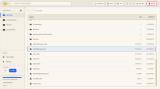
Start it on the 3DS and open its address in a browser on the same Wi-Fi. The top screen shows the address as a QR code for your phone.
In the browser you can search and sort folders, preview images and text files, and edit text and save it back. Files can be uploaded and downloaded, and copied, moved, renamed or deleted. Folders you use a lot can be pinned to the sidebar, and free space is shown.
The page is in English or Chinese. Settings are kept in sdmc:/3ds/FileBrowser/config.json.
In the browser you can search and sort folders, preview images and text files, and edit text and save it back. Files can be uploaded and downloaded, and copied, moved, renamed or deleted. Folders you use a lot can be pinned to the sidebar, and free space is shown.
The page is in English or Chinese. Settings are kept in sdmc:/3ds/FileBrowser/config.json.
Release notes
v1.0.0 · Feb 14, 2026
First release, see readme.
Full Changelog: https://github.com/ZIXT233/3DS-FileBrowser/commits/v1.0.0