
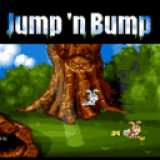
Jump Bump v1.02 by rsn8887
This is my Switch and Vita port of the classic multiplayer-only MS-DOS game Jump'n'Bump by Brainchild Design, based on the SDL2 port by @felixhaedicke.
Install on your Vita
In VitaShell, hold Left on the D-pad and press ○ to open the QR code scanner, then point the Vita's back camera at the code.
| File | Size | |
|---|---|---|
| jumpnbump_1.00.vpk e58de955…12d7 | 1.2 MB | Download |
Other ways to install
Copy it to the memory card: copy jumpnbump_1.00_brewology_com.vpk to ux0: (USB or FTP in VitaShell), open it in VitaShell and press ✕ to install it.
Screenshots
About Jump Bump
Overview
=====
This is my Switch and Vita port of the classic multiplayer-only MS-DOS game Jump'n'Bump by Brainchild Design, based on the SDL2 port by @felixhaedicke.
Jump'n'Bump is a simple but addictive multiplayer game. The goal is to stomp as many other rabbits as possible to win the game.

Thanks
======
Thanks to my supporters on Patreon: Andyways, Count Duckula, Jesse Harlin, Thomas Luten, Matthew Machnee, Mored4u, Ibrahim Fazel Poor, RadicalR.
Thanks to the many developers of the game, such as Mattias Brynervall, Andreas Brynervall, Anders Nilsson, and many more.
Thanks to Felix Haedicke for porting the game to SDL2 and Cmake.
Installation Instructions
=====
Switch:
- Extract the contents of jumpnbump_switch.zip into the
switchfolder on your SD card, so that you have a folderswitch/jumpnbumpwithjumpnbump.nroinside.
Vita:
- install the .vpk file using Vitashell
Switch/Vita-exclusive features
=====
- Split Joycon support (Switch only): To toggle between split and combined Joycons, press L on joycon 1.
- Physical keyboard support via Bluetooth (Vita) and USB (Switch)
Controls
=====
Left analog stick / Dpad = move the character, up to four controllers are supported
B / Y / A / X = Jump
Plus/Minus/Select/Start = ESC (restart game/advance through statistic screens)
R (on controller 1) = toggle aspect ratio between original (default), 4:3, and 16:9
L (on controller 1) = toggle split Joycon mode on/off (Switch only)
Physical keyboard controls via Bluetooth (Vita) and USB (Switch):
Cursor keys = white rabbit move and jump
a d w = yellow rabbit move and jump
i j l = gray rabbit move and jump
Keypad 4 / 8 / 6 = brown rabbit move and jump
Build Instructions
=====
Switch:
cmake -DBUILD_NX=ON -DCMAKE_RELEASE_TYPE=Release
make jumpnbump_switch.zip -j12
Vita:
cmake -DBUILD_PSP2=ON -DCMAKE_RELEASE_TYPE=Release
make jumpnbump.vpk -j12
Changelog
=====
v1.02 (Switch only)
- Re-compile with 12.0.0 support
v1.01 (Switch only)
- Re-compile with 9.0.0 support
v1.00
- First release on Switch and Vita
Release notes
v1.02 · jumpnbump_1.00.vpk · May 23, 2021
Overview
=====
This is my Switch and Vita port of the classic multiplayer-only MS-DOS game Jump'n'Bump by Brainchild Design, based on the SDL2 port by @felixhaedicke.
Jump'n'Bump is a simple but addictive multiplayer game. The goal is to stomp as many other rabbits as possible to win the game.

Thanks
======
Thanks to my supporters on Patreon: Andyways, Count Duckula, Jesse Harlin, Thomas Luten, Matthew Machnee, Mored4u, Ibrahim Fazel Poor, RadicalR.
Thanks to the many developers of the game, such as Mattias Brynervall, Andreas Brynervall, Anders Nilsson, and many more.
Thanks to Felix Haedicke for porting the game to SDL2 and Cmake.
Installation Instructions
=====
Switch:
- Extract the contents of jumpnbump_switch.zip into the
switchfolder on your SD card, so that you have a folderswitch/jumpnbumpwithjumpnbump.nroinside.
Vita:
- install the .vpk file using Vitashell
Switch/Vita-exclusive features
=====
- Split Joycon support (Switch only): To toggle between split and combined Joycons, press L on joycon 1.
- Physical keyboard support via Bluetooth (Vita) and USB (Switch)
Controls
=====
Left analog stick / Dpad = move the character, up to four controllers are supported
B / Y / A / X = Jump
Plus/Minus/Select/Start = ESC (restart game/advance through statistic screens)
R (on controller 1) = toggle aspect ratio between original (default), 4:3, and 16:9
L (on controller 1) = toggle split Joycon mode on/off (Switch only)
Physical keyboard controls via Bluetooth (Vita) and USB (Switch):
Cursor keys = white rabbit move and jump
a d w = yellow rabbit move and jump
i j l = gray rabbit move and jump
Keypad 4 / 8 / 6 = brown rabbit move and jump
Build Instructions
=====
Switch:
cmake -DBUILD_NX=ON -DCMAKE_RELEASE_TYPE=Release
make jumpnbump_switch.zip -j12
Vita:
cmake -DBUILD_PSP2=ON -DCMAKE_RELEASE_TYPE=Release
make jumpnbump.vpk -j12
Changelog
=====
v1.02 (Switch only)
- Re-compile with 12.0.0 support
v1.01 (Switch only)
- Re-compile with 9.0.0 support
v1.00
- First release on Switch and Vita