
pxmil v0.1.0 by j3tm0t0
Sharp X1 emulator, a PSP port of X millennium that boots your disk images with a built-in IPL and no ROM files
Install on your PSP
EBOOT: make a folder for it in /PSP/GAME/ on the Memory Stick, such as /PSP/GAME/PXMIL/, and copy EBOOT.PBP into it.
Start it from Game › Memory Stick. On a PSP Go without a Memory Stick, use /PSP/GAME/ on the internal storage.
Files
| File | Size | SHA-256 | |
|---|---|---|---|
| EBOOT.PBP | 2.0 MB | cda0fa91…c131 | Download |
Screenshots
About pxmil
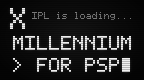
j3tm0t0's port of X millennium, Punyu's emulator of the Sharp X1 home computer, built on xmil-libretro with a PSP front end of its own. A built-in stand-in IPL means it starts without any ROM files, and sound covers the PSG and OPM chips. The author says it runs at a full 60 fps on a real PSP.
Put your disk images (.2d, .d88, .88d or .2hd) in the disk folder inside the game folder. The first one goes in drive 0 at start, and you can swap disks from the menu. There's an on-screen keyboard, auto fire and three aspect modes, and settings are saved to xmil.cfg.
- D-Pad or analog stick: X1 joystick
- Circle / Cross: buttons 1 / 2
- Triangle / Square: auto fire on buttons 1 / 2
- L: on-screen keyboard
- R: aspect ratio (8:5 dot for dot, 4:3, stretched)
- L + R: swap Circle and Cross
- Select: menu (disks, reset, CPU clock, FPS display, quit)
- Start: reset
It needs custom firmware.
Release notes
v0.1.0 · pxmil v0.1.0 · Oct 6, 2026
X1 エミュレータ X millennium の PSP 移植、最初のリリース。
- 実機 PSP で全区間 60fps (GU パイプライン描画、ディスクイメージ RAM キャッシュ)
- SDL2 サウンド (22050Hz)
- リスト型メニュー (SELECT): ディスク入替・リセット・アスペクト・CPU クロック・FPS 表示
- ソフトウェアキーボード (L)、連射 (△/□)、ボタン入替 (L+R)
- 設定は xmil.cfg に自動保存
導入: EBOOT.PBP を ms0:/PSP/GAME/PXMIL/ に置き、ディスクイメージ (.2d/.d88) を同 disk/ フォルダへ。
Based on X millennium (retropc.net/yui) / xmil-libretro.