

PSPotify ME v0.3.2-alpha by Luxotick
Spotify client that runs on the PSP alone, with search, playlists, Liked Songs and full tracks decoded on the Media Engine
Install on your PSP
Archive: extract PSPotify-ME.zip. It is laid out from the root of the Memory Stick: copy it there, so you have /PSP/GAME/PSPOTIFY/.
Start it from Game › Memory Stick. On a PSP Go without a Memory Stick, use /PSP/GAME/ on the internal storage.
Files
| File | Size | SHA-256 | |
|---|---|---|---|
| PSPotify-ME.zip | 448 KB | c6ee2286…dfa6 | Download |
Screenshots
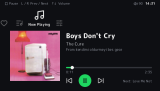
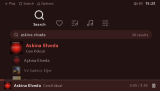
About PSPotify ME
Everything runs on the PSP: there's no PC, phone app or proxy in between. It needs a Spotify Premium account. You sign in once by entering a six-letter code at spotify.com/pair, where the approval page names the client Spotify for Desktop.
The interface is in the style of the XMB, with Search, Recently played, Liked Songs, your playlists and album covers. You can queue songs and save them to Liked Songs. Full tracks stream as 160 kbps Ogg Vorbis and are decoded on the Media Engine, the PSP's second CPU. There's seeking, shuffle, repeat, an equaliser, a sleep timer and a setting for the same loudness on every song. Themes are text files, and the author's theme site makes them in a browser. The app can update itself from the PSP.
- Left / Right: change category
- Up / Down: move, or volume on Now Playing
- Cross: open or play
- Circle: back
- Square: pause
- Triangle: song menu
- L / R: previous or next song, hold to seek
- Start: quit
It needs ARK on firmware 6.61 (6.60 works on the PSP-1000 and Go) and a saved Wi-Fi profile. The author lists it working on the PSP-1000, 2000, 3000 and Go, and calls it a work in progress. Only Latin letters show, and since October 2026 Spotify refuses audio keys to some newer accounts, even with Premium.
Release notes
v0.3.2-alpha · PSPotify ME v0.3.2-alpha · Oct 26, 2026
A fix-up release. On v0.3.1 you can install it from the PSP: the app asks at start, or use Settings → About.
Fixed
- Refused tracks. Since October 2026 Spotify refuses the audio key (error
0x0001) to some accounts in every third-party player that works like this one (librespot #1649). Asking again right away, as the app did, makes the refusals worse. Now it waits 3, 5, then 10 seconds before the next request, no longer reconnects to Spotify after a refusal, and after three refusals in a row it stops and says "Spotify refuses keys to this account". This helps older accounts that hit a burst of refusals. Accounts Spotify refuses outright, which are mostly newer ones, still can't play, and there is no known fix for them. - Long sessions. Sign-in tokens now renew in the background every 50 minutes, so browsing and search keep working after an hour even when no new song starts.
- End of a list. When the list you're playing runs out, the app says "End of the list" instead of silently stopping, and pressing next on the last song says the same.
Install
On v0.3.1: install from the PSP (it asks at start, or Settings → About).
On anything older: extract PSPotify-ME.zip to the root of the Memory Stick (ms0:/PSP/GAME/PSPOTIFY/EBOOT.PBP and the THEMES folder next to it). Updating keeps your pairing and settings.
Requirements: PSP-1000, 2000, 3000 or Go; 6.61 with ARK CFW (6.60 also works on the PSP-1000 and Go); a saved Wi-Fi profile; Spotify Premium.
EBOOT SHA-256: 454db1b6fce22c6afdf38751b8c06c1a24eabbf3098476c2e8f2a0160d89bfc6