

PSPad v1.0.0 by muxira
Turns the PSP into a USB gamepad for a PC, as a DualShock 4, an Xbox 360 controller or a generic HID pad
Install on your PSP
Archive: extract PSPad.zip. It is laid out from the root of the Memory Stick: copy it there, so you have /PSP/GAME/PSPad/.
Start it from Game › Memory Stick. On a PSP Go without a Memory Stick, use /PSP/GAME/ on the internal storage.
Files
| File | Size | SHA-256 | |
|---|---|---|---|
| PSPad.zip | 1.8 MB | b147dab7…2ab0 | Download |
Screenshots
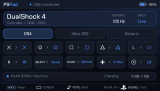
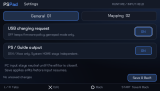
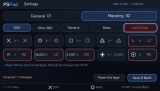
About PSPad
Plug the PSP into a computer with a USB data cable and it shows up as a DualShock 4, an Xbox 360 controller or a standard HID gamepad. The PC uses its normal controller drivers, so there's no companion app to install. The volume buttons switch between the three types while it runs.
Each controller type has its own button mapping, with a second layer you get by holding Note. The screen button turns the display off while the pad keeps working, and the WLAN switch mutes the input to the PC. The home screen shows the battery and charging state, the USB link and the report rate.
It needs custom firmware. The developer built it on a PSP-3001 with 6.61 and mostly used Windows on the PC side.
- Start (standby screen): start the controller
- Square (standby screen): settings and mapping
- Volume + / -: switch controller type
- Note held: second mapping layer
- Screen: display off or on
- WLAN switch up + Home held 1 second: quit
Release notes
v1.0.0 · PSPad v1.0.0 · Oct 15, 2026
PSPad
Turn a PSP into a USB controller: DualShock 4, Xbox 360 or Generic HID.
- Native 480×272 Chakra Petch interface with physical button highlights.
- General and per-controller Mapping, including a NOTE-held layer.
- Safe runtime remapping with PRX acknowledgement before input resumes.
- USB charging request, PS/Guide output option and measured battery status.
- Live volume-key mode switching; SCREEN off without stopping USB input.
- Persistent settings with validation, atomic writes and backup recovery.
Install
Download PSPad.zip, not GitHub's automatic source archives. Extract its PSP
folder to the Memory Stick root. Requires compatible custom firmware; tested on
PSP-3001 / CFW 6.61, primarily with Windows.
When upgrading, exit the application first. Replace **both EBOOT.PBP and
pspad.prx from this release**. Keep your settings.cfg, boot.cfg, backups and
existing INI files. Never replace binaries while PSPad is running.
Launch from XMB, press a fresh START and connect a data-capable USB cable.
No PSPad PC companion or DS4Windows installation is required. The PC needs its
normal controller drivers.
SHA256SUMS.txt contains checksums for the extracted application files, using
paths relative to the release ZIP root. Host/visual tests and the official PSP
SDK build gate the release; they do not guarantee every PSP/CFW/game combination.