

psp5 v2.1.1 by 08Weber
Launcher in the style of the PS5 home screen for ARK-4 and ARK-5, which can also replace ARK's own menu
Install on your PSP
Archive: extract psp5-v2.1.1-ARK4.zip. It is laid out from the root of the Memory Stick: copy it there, so you have /PSP/GAME/PSP5/.
Start it from Game › Memory Stick. On a PSP Go without a Memory Stick, use /PSP/GAME/ on the internal storage.
Files
| File | Size | SHA-256 | |
|---|---|---|---|
| psp5-v2.1.1-ARK4.zip | 1.2 MB | fa6d790a…5190 | Download |
| psp5-v2.1.1-ARK5.zip | 1.2 MB | c3599876…3437 | Download |
| psp5-v2.1.1-PSPGo-ARK4.zip | 1.2 MB | a1a13ad7…e53e | Download |
| psp5-v2.1.1-PSPGo-ARK5.zip | 1.2 MB | 3a0da472…4dde | Download |
Screenshots
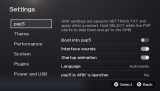
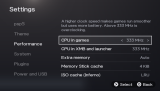
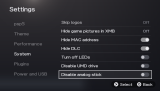
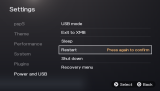
About psp5
The top row holds your pinned and recently played games, with the selected game's artwork behind it. Its last tile opens the full library of games and homebrew, sorted by name or by date added. Search has an on-screen keyboard. Media has a music player for the MP3s in ms0:/MUSIC that keeps going while you browse, plus pictures and PMF videos. Games start the same way ARK's own menu starts them, and psp5 frees its memory first.
Settings has ARK's options (CPU speed, extra memory, plugins, USB charging), USB mode, a file manager and themes. The themes cover the PS5 console colours and the look of the PS1 to PS4, or you can use your own wallpaper. Games kept in folders under PSP/GAME show up as categories.
- L and R: Games, Media, Search, Settings
- Square: pin or sort
- Cross or Start: start the game
- Select: categories
- Home: a panel with sleep, USB, files, settings, XMB, restart and power off
- Note, or L + R + Start: screenshot to PICTURE/PSP5
If it ever goes wrong, hold Select while the PSP boots and ARK skips to the normal XMB. psp5 never writes to flash0. The author uses it on a PSP-2000 with ARK-5 and says the PSP Go build hasn't been tried on real hardware yet.
Release notes
v2.1.1 · psp5 v2.1.1 – fixes from your reports · Nov 2, 2026
psp5 2.1.1 fixes the things you reported after 2.1.0: USB mode on the PSP Go, △ for Settings, the Games row and navigation, and TempGBA single-game titles and icons. Your settings, covers, pins and music stay when you update.
> [!IMPORTANT]
> A note on unofficial copies and clones
> There are several copies and re-uploads of psp5 circulating right now. Please be careful with what you download and install on your PSP — the official builds are only published here on github.com/08Weber/psp5.
>
> It is genuinely fun to see that psp5 has inspired others, but it is disappointing to see people pass it off as their own work and their own ideas when psp5 was built from the ground up by me together with this community.
Which file do I download?
Not sure which ARK you have? Press SELECT in the XMB: ARK's menu shows ARK 4.x or ARK 5.x.
| Your PSP | Download this |
|---|---|
| PSP-1000, 2000, 3000 or E1000 Street with ARK-5 | psp5-v2.1.1-ARK5.zip |
| PSP-1000, 2000, 3000 or E1000 Street with ARK-4 | psp5-v2.1.1-ARK4.zip |
| PSP Go with ARK-5 | psp5-v2.1.1-PSPGo-ARK5.zip |
| PSP Go with ARK-4 | psp5-v2.1.1-PSPGo-ARK4.zip |
What's fixed in 2.1.1
USB mode (#29)
- USB mode now starts exactly the way ARK's own menu does. On the PSP Go it could stay on Waiting for the USB cable forever.
- If the cable is detected but the computer never connects, psp5 tries again once by itself after 5 seconds.
- psp5 writes what happened to
PSP5/usb.logwhen you leave USB mode. If USB still doesn't work on your PSP, please attach that file to an issue.
Controls
- △ opens Settings again from Games, Media and the Library, like before 2.1.0 (#34). Search is still on L / R.
- No more scrolling past the end by accident (#32). Holding a direction now stops at the first or last game. Press it again to wrap around to the other end. This works in Games, the Library, Music, Pictures, Videos and Search.
Games row
- All games on the Games screen (#30). Turn on Settings → psp5 → All games on Games screen to show every game in the row again, not only your pinned and 8 most recently played games. It's off by default.
- Move is back (#31). Press □ on a pinned game and choose Move, then use ← → to put your pinned games in your own order. With All games on Games screen turned on, you can move every game.
Games
- TempGBA single-game EBOOTs and game updates (#37). Games with a
PBOOT.PBPnext to theirEBOOT.PBPnow show the title and icon from it, like the XMB does. TempGBA single-game folders no longer show up as grey cards with no name. - A game with an empty title now shows its folder or file name.
The first start after updating scans your games once more, so it takes a little longer than usual.
Coming in 2.2.0: playing UMD Video ISOs and discs from the Videos tab (#27).
Thank you
A big thank you to @boubounokefalos, @rubuntu247, @lkd8, @mootjedepro and everyone else who shared brilliant ideas, tested on different PSP models and reported issues — psp5 keeps getting better because of you.
Install or update
Unzip the file for your PSP and copy the PSP folder over the old one: to the memory stick on a PSP-1000/2000/3000/E1000, or to the internal storage on a PSP Go. Your settings and covers stay. If you use psp5 as ARK's launcher, also copy ARK_LAUNCHER/VBOOT.PBP into PSP/SAVEDATA/ARK_01234/ again. The full guide is in INSTALL.md.
If your PSP gets stuck
Hold SELECT while turning on the PSP. ARK then skips its settings and starts the normal XMB.