

psp5 authentic v1.3.1 by Xioonae
Xioonae's fork of the psp5 launcher, kept close to the home console look, with music, video and picture players, a file manager and FTP
Install on your PSP
Archive: extract psp5-authentic-v1.3.1-ARK4.zip. It is laid out from the root of the Memory Stick: copy it there, so you have /PSP/GAME/PSP5/.
Start it from Game › Memory Stick. On a PSP Go without a Memory Stick, use /PSP/GAME/ on the internal storage.
Files
| File | Size | SHA-256 | |
|---|---|---|---|
| psp5-authentic-v1.3.1-ARK4.zip | 2.3 MB | 18f93601…4629 | Download |
| psp5-authentic-v1.3.1-ARK5.zip | 2.3 MB | fbb6ebb0…5e3f | Download |
Screenshots
About psp5 authentic
A fork of Mille Weber's psp5, from its version 1.5.3, that follows the home console's look and feel as closely as it can. The whole interface is drawn by the program and works with the D-pad alone. It runs as a normal app, or as ARK's own launcher so the PSP starts in it.
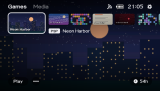
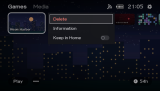
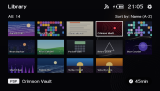
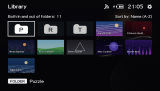
Games shows your recent games as big cards, and the Library holds everything in a grid sorted by name, date added or size, with folders from the Categories Lite plugin. A small helper plugin counts play time. Media plays music (MP3, WAV, AAC and ATRAC3) with playlists and a sleep timer, videos (MP4 and PMF) and pictures. Settings has a file manager with a text editor, an FTP server, USB mode, storage and saved data managers, plugin management, ARK's own settings, and themes in the colours of the PS1 to PS4.
It needs ARK-4 or ARK-5, with a zip for each, and runs on every PSP model and on the Vita with ARK-5. The maintainer tries each update on a PSP-1000 and asks for reports, PSP Go owners especially, as USB mode didn't work on one Go. The FTP server has no password, so use it on your own network.
- Cross / Circle: confirm, back
- Start: options
- Select: power menu
- L / R: switch tabs
Release notes
v1.3.1 · Nov 20, 2026
psp5-authentic 1.3.1 – playlists, a sleep timer, better Music player buttons and a hint for the PSP Go regarding USB Mode
New
- Playlists (
.m3uand.m3u8), for songs and for videos. A playlist in theMUSICfolder shows in the Music screen and opens like a folder: ✕ plays a song and the playlist goes on from there, with shuffle, repeat and previous / next as usual. The songs can lie in any folder and on either storage. The same works for videos in theVIDEOfolder, and one playlist can hold songs and videos. In the File Manager ✕ on a playlist asks Open or Edit (the text editor). - The
PSP/PLAYLISTfolder – where the PSP keeps its own playlists – is offered in Music and Videos when it exists, next toMUSICandVIDEO. The choice at the start has two steps now (the storage, then the folder), and a step with only one answer is left out. The Images screen works the same way. - A sleep timer for the player. The ⋯ popup has a new row, Sleep timer: Off, 15 min, 30 min, 45 min, 1 h, 1 h 30 min or 2 h. When the time is up the music stops (also a paused song); the PSP itself does not go to sleep. The row shows the time that is left.
- A loudspeaker with two sound waves is the volume symbol of the player's button and of the volume bar. The symbols of the player's buttons are the same size now (the speaker looked very big and the pause and play symbols too small).
- The volume button no longer shows the "..." popup fading away when you end it, and the volume bar fades at once.
- USB Mode on a PSP Go. We took over what the original psp5 learned for a PSP Go that did not show up on the computer: a cable that is seen for 5 seconds without the computer connecting makes USB switch off and on once, a USB that is still on from before is switched off first, and the storage is synced before the computer takes it over. On the PSP Go of the user that reported this it did not help (see below), so a PSP Go now gets a hint on the USB screen after 10 seconds without a computer: leave USB Mode and connect in the XMB (Settings > USB Connection).
- Docs. The PSP E-1000 is on the list of devices. INSTALL.md is in a better order and says that updating ARK overwrites the ARK launcher. The README pictures are taken again.
PSP Go owners: please test USB Mode
One PSP Go (ARK-4) owner reported that the computer does not see the PSP in Settings → Storage → USB Mode, although the PSP charges and the XMB's own USB connection works. ARK-4's own launcher has the same problem on it, and we found nothing in psp5 authentic that could fix it. We do not know yet whether this is every PSP Go's problem or only that specific one's, and ARK-5 on a PSP Go has not been tried.
If you have a PSP Go, please try USB Mode and open an issue whichever way it goes (the computer sees the PSP, or it does not), with your ARK version (4 or 5), your computer (Windows, macOS or Linux) and what the USB screen says.
Thanks to the original psp5
psp5 authentic is a fork of psp5 by Mille Weber (08Weber). It is based on psp5 v1.5.3, and the issues of the original project showed us what could go wrong on a PSP, this time with USB on a PSP Go (issue 20, issue 29, issue 40). The code here is our own; thank you to Mille Weber, and to everyone who reported problems there.
Something not working?
Please open an issue and tell us what you saw, which PSP you have and which ARK version. If a song, a video, a playlist or the FTP Server failed, attach the matching file from PSP5/logs on your Memory Stick.
Which zip do I need?
| Your device | Download |
|---|---|
| PSP-1000, 2000, 3000, E-1000, PSP Go or PS Vita with ARK-5 | psp5-authentic-v1.3.1-ARK5.zip |
| PSP-1000, 2000, 3000, E-1000 or PSP Go with ARK-4 | psp5-authentic-v1.3.1-ARK4.zip |
Not sure which ARK you have? Press SELECT in the XMB.
Download
Pick the zip for your ARK: ARK5 or ARK4. Copy the PSP folder onto your Memory Stick – it replaces 1.3.0 and keeps your settings and covers. Steps are in INSTALL.md; every change is in CHANGELOG.md. Stuck? Hold SELECT while turning on the PSP.