

psp-texthook fa5de19 by ryougennn
Japanese learning aid: takes the text from supported games for a pop-up dictionary on the PSP and a live text page on your phone or PC
Install on your PSP
Plugin: extract psp-texthook.zip and copy texthook.prx, thkcore.prx, thkpopup.prx to /SEPLUGINS/ on the Memory Stick. On ARK-4 and ARK-5, add a line for it to /SEPLUGINS/PLUGINS.TXT:
game, ms0:/SEPLUGINS/texthook.prx, on
Files
| File | Size | SHA-256 | |
|---|---|---|---|
| psp-texthook.zip | 17.9 MB | 53be6f2d…eb13 | Download |
Screenshots
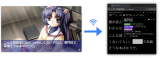
About psp-texthook
A set of plugins by ryougennn that read the line of text a supported game is showing. L + R puts the line over the game with JMdict entries for each word, conjugations included, plus character names from VNDB, and the D-pad steps through it word by word. With the Wi-Fi switch on, the lines also appear live on a web page served by the PSP at http://psp.local/, or through the QR code it puts on screen, with a reading timer, characters per hour and regex replacements. Make an Anki card while the page is open on a PC and a screenshot of the PSP's screen is added to it.
It works with twelve Japanese games so far, among them CLANNAD, Kanon, AIR, Amagami, Little Busters! Converted Edition, SNOW Portable and Suzumiya Haruhi no Yakusoku. The author welcomes hooks for more.
It needs ARK-5 on 6.60 or 6.61, since it's built on ARK's SystemControl API, and about 40 MB on the Memory Stick. The web page needs a 2.4 GHz Wi-Fi network saved in the XMB. The author has only run it on a PSP-1000 and warns that things might break.
Release notes
fa5de19 · psp-texthook fa5de19 · Oct 19, 2026
Requirements
- A PSP running 6.60 or 6.61 with ARK-5 custom firmware. The plugin is built on ARK's SystemControl API, so other CFWs probably won't work. Only tested on a PSP-1000.
- About 40 MB free on your memory stick (the dictionaries are most of it).
- For the web page: a 2.4 GHz Wi-Fi network (WPA/WPA2 or open) saved as a network profile in the XMB. A phone hotspot works fine.
- One of the supported games (list below).
- Any model of PSP (1000, 2000, 3000, Go, Street).
Installing
- Download
psp-texthook.zipbelow and extract it to the root of your memory stick. Everything goes intoSEPLUGINS/texthook/. - Open
SEPLUGINS/PLUGINS.TXT(create it if it doesn't exist) and add this line: game, ms0:/SEPLUGINS/texthook/thkcore.prx, on Only addthkcore.prx. It loads the other plugins itself when they're needed. - Optional, but highly recommended: rename
config.ini.exampletoconfig.iniin the same folder and modify it to pick a network profile by SSID, change the port or hostname, or move/disable the on-screen messages. - Boot a supported game.