

Pocketwatch v0.1.0-alpha.2 by semiloker
Save states for games on a real PSP from an in-game HOME menu, with an XMB-style home screen for music, photos and settings
Install on your PSP
Archive: extract pocketwatch-v0.1.0-alpha.2.zip and take the PSP folder from inside pocketwatch-v0.1.0-alpha.2/. It is laid out from the root of the Memory Stick: copy it there, so you have /PSP/GAME/PocketwatchHome/.
Start it from Game › Memory Stick. On a PSP Go without a Memory Stick, use /PSP/GAME/ on the internal storage.
Files
| File | Size | SHA-256 | |
|---|---|---|---|
| pocketwatch-v0.1.0-alpha.2.zip | 840 KB | 0ef2c83e…e3ec | Download |
Screenshots
About Pocketwatch
semiloker's ARK-4 plugin, written from scratch. Press HOME in a game to pause it and open a menu with Resume, Save State and Load State (five slots for each game, with thumbnails), Screenshot and Quit, in one of three styles. In the XMB it adds Settings > Pocketwatch, battery details and play time for each game.
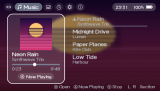
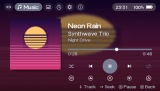
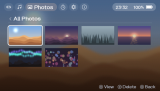
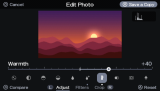
Pocketwatch Home is a home screen of its own, and the PSP can start in it in place of the XMB. It has your games, a music player, photos with an editor, USB, Wi-Fi connections and battery calibration. An experimental overlay shows the frame rate, processor load, volume and brightness in games. The menus come in nine languages.
The author calls it a pre-release, has only run it on a PSP-3000 with ARK-4 on 6.61 and says save states are experimental, so back up your Memory Stick first. A state only loads on the setup that made it. Save states don't work on the PSP-1000, homebrew doesn't get the in-game menu, and it shouldn't run alongside another save state plugin such as PSPStates.
Release notes
v0.1.0-alpha.2 · Oct 29, 2026
Pre-release. Tested on one PSP-3000 with ARK-4 on 6.61 only. Back up your Memory Stick
(at least PSP/SAVEDATA) before you use save states.
What is in the zip
| Part | File on the Memory Stick | What it does |
|---|---|---|
| Game plugin | seplugins/pocketwatch/pocketwatch.prx | HOME in a game opens Pocketwatch's menu: Resume, Save State, Load State, Screenshot, Quit Game |
| XMB plugin | seplugins/pocketwatch/pocketwatch_xmb.prx | XMB → Settings → Pocketwatch and Battery, XMB → Game → Play Time, the start-screen choice |
| Pocketwatch Home | PSP/GAME/PocketwatchHome/EBOOT.PBP and PSP/SAVEDATA/ARK_01234/PWHOME.PBP | A home screen of its own: games, music, photos, settings, USB, Wi-Fi |
| Overlay (experimental) | seplugins/pocketwatch/pocketwatch_perf.prx | FPS and volume/brightness indicator in games; off until Home turns it on |
| Translations | seplugins/pocketwatch/lang/*.txt | The menus follow the system language (English is built in) |
Install
**The install guide has every step,
how to check it worked, and what to do when it does not.**
The short version, for a PSP already running ARK-4 on firmware 6.61:
- Download the zip below under Assets and unzip it. Copy the
sepluginsandPSPfolders from inside its folder to the root of the Memory Stick and merge them with the folders already there. - Add these two lines to
seplugins/PLUGINS.TXT. On a PSP Go's internal storage, writeef0:instead ofms0:(untested).
   UMD, ms0:/seplugins/pocketwatch/pocketwatch.prx, on
   VSH, ms0:/seplugins/pocketwatch/pocketwatch_xmb.prx, on
Do not add a line for pocketwatch_perf.prx: Home → Settings → Pocketwatch → Overlay in Games
writes it.
- Turn the PSP off and on again. With a Live install of ARK-4, run ARK Loader again as well. Pocketwatch appears under XMB → Settings → Pocketwatch, and HOME in a game opens its menu.
- Optional: to start the PSP in Pocketwatch Home instead of the XMB, open XMB → Settings → Pocketwatch → Start screen → Pocketwatch Home. You can also start Home from Game → Memory Stick.
If something goes wrong at power-on:
| Hold at power-on | Result |
|---|---|
| START | ARK-4 loads no plugins, so you can fix PLUGINS.TXT |
| L | The XMB starts this once, even when Pocketwatch Home is the start screen. On a permanent ARK-4 install with DC-ARK, L may start DC-ARK instead: use Home's Exit to the XMB. |
To uninstall, set the Start screen back to XMB, delete the two lines from PLUGINS.TXT, then theseplugins/pocketwatch and PSP/GAME/PocketwatchHome folders andPSP/SAVEDATA/ARK_01234/PWHOME.PBP.
Known issues
- Save states are experimental. A state loads only on the same setup that made it: same Pocketwatch version, game file and PSP. States from an older version are refused. Loading after a power-off has not been fully tested on the device yet.
- The 3rd Birthday rebooted the PSP during a save once.
- Do not use Pocketwatch together with another savestate plugin, such as PSPStates or Custom Home's states.
- The in-game overlay is experimental. Leave it off unless you are testing it: an earlier version turned the PSP off on Quit Game.
- After USB Connection, Pocketwatch Home restarts by design. This keeps the Memory Stick's files safe.
- The Internet Browser in Home fails to open (error
0x800200D9). - ARK-4's L+R+START+DOWN combo turned the PSP off once instead of opening ARK-4's menu. Whether Pocketwatch causes this has not been tested yet.
- The brightness bar counts the PSP-3000's five steps (its backlight levels 44, 60, 72, 84 and ARK-4's fifth). On another model it may show the wrong step.
- Not supported: the PSP-1000 for save states (it has too little RAM) and CFWs other than ARK-4.
Report a problem
Open an issue: <https://github.com/semiloker/pocketwatch/issues/new/choose>. Include your PSP
model, your ARK-4 version and the game's ID, and attach the log that matches where it happened:
| Where | Log |
|---|---|
| In a game | seplugins/pocketwatch/pocketwatch.log |
| In the XMB | seplugins/pocketwatch/xmb.log and boot.txt |
| In Pocketwatch Home | seplugins/pocketwatch/home.log |
A log names your game's file (game: ... from ms0:/ISO/...). Issues are public, so you may want to
remove that part before you post it.
What's Changed
- Player keys and seek, photo editor rework, brightness bars by the step, M7 probe by @semiloker in https://github.com/semiloker/pocketwatch/pull/13
Full Changelog: https://github.com/semiloker/pocketwatch/compare/v0.1.0-alpha.1...v0.1.0-alpha.2