
Panel PSP v1.1.0 by JuanCarlosGP
Diagnostic panel that shows the battery, Memory Stick space, volume and WLAN switch, and tests the buttons and analog stick
Install on your PSP
Archive: extract Panel-PSP.zip. It is laid out from the root of the Memory Stick: copy it there, so you have /PSP/GAME/PANELPSP/.
Start it from Game › Memory Stick. On a PSP Go without a Memory Stick, use /PSP/GAME/ on the internal storage.
Files
| File | Size | SHA-256 | |
|---|---|---|---|
| Panel-PSP.zip | 320 KB | 8ee07d6f…d329 | Download |
Screenshots
About Panel PSP
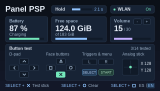
The main panel shows the battery level, free space on the Memory Stick, the system volume and the position of the WLAN switch. It reads the volume and the volume buttons through ARK-5's functions.
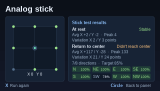
The button test covers 14 buttons, the volume buttons included. A quick press marks a button blue, and holding it for 5 seconds straight turns it green. The stick test has three parts: at rest it measures how far the stick sits from centre and how much it jitters, then it watches whether the stick returns to centre after a push, and last it maps the range you reach as you sweep round the edge.
- Select + Cross: stick test
- Select + Circle: clear the button marks
- Select + Square: switch between English and Spanish
The author runs it on a PSP-3004 with 6.61 and ARK-5.2.2.
Release notes
v1.1.0 · Panel PSP v1.1.0 · Nov 14, 2026
Panel PSP now supports English and Spanish in the same app. It remembers your language choice when you reopen it.
The shortcuts are grouped along the bottom of the main panel.
- SELECT + X opens the analog stick test.
- SELECT + ○ (Circle) clears the button test marks.
- SELECT + □ (Square) switches between English and Spanish. The active language is highlighted.
Download Panel-PSP.zip and copy its PSP folder to the root of your Memory Stick. Then open Game → Memory Stick → Panel PSP. Tested on a PSP-3004 running 6.61 with ARK-5.2.2.
Español
Panel PSP ahora incluye español e inglés en la misma app y guarda el idioma que elijas.
Los tres atajos están abajo en el panel principal.
- SELECT + X abre la prueba del stick.
- SELECT + ○ (círculo) borra las marcas de los botones.
- SELECT + □ (cuadrado) cambia el idioma y resalta el que está activo.
Descarga Panel-PSP.zip y copia su carpeta PSP a la raíz de la Memory Stick. Después, abre Juego → Memory Stick → Panel PSP. Probado en una PSP-3004 con firmware 6.61 y ARK-5.2.2.