
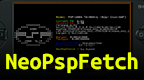
NeoPspFetch v1.2 by Wyped
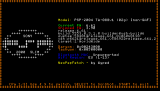
System and battery information next to ASCII art, in the style of neofetch on Linux
Install on your PSP
Archive: extract NeoPspFetch_v1.2+source_code.zip and copy the NeoPspFetch folder into /PSP/GAME/ on the Memory Stick.
Start it from Game › Memory Stick. On a PSP Go without a Memory Stick, use /PSP/GAME/ on the internal storage.
Files
| File | Size | SHA-256 | |
|---|---|---|---|
| NeoPspFetch_v1.2+source_code.zip | 570 KB | c2bb1dfd…c360 | Download |
Screenshots
About NeoPspFetch
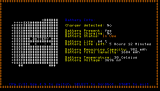
Shows the firmware, the firmware the console shipped with, the motherboard and battery details such as charge, capacity and temperature, laid out like neofetch. It's signed, so it runs on official firmware too. The PSP Go and Street have no battery chip to read, so some battery fields show as unsupported there.
- Left and Right: change page
- Select: screenshot, saved in ms0:/PICTURE/NeoPspFetch
- Start: quit
It doesn't run on a Vita in Adrenaline or in emulators. The author has used it with Sony and Ostent batteries and says other brands may differ.
- Left and Right: change page
- Select: screenshot, saved in ms0:/PICTURE/NeoPspFetch
- Start: quit
It doesn't run on a Vita in Adrenaline or in emulators. The author has used it with Sony and Ostent batteries and says other brands may differ.
Release notes
v1.2 · NeoPspFetch - v1.2 · Jun 3, 2026
What's Changed
- PSP Street support by @Wyped in https://github.com/Wyped/NeoPspFetch/pull/3
Full Changelog: https://github.com/Wyped/NeoPspFetch/compare/v1.1...v1.2