

Ingame Time Counter v1.2.0 by stepigor
Two plugins that count how long you've played each game and show the total on the game's Information screen in the XMB
Install on your PSP
Plugin: copy ingame_timecounter_game.prx to /SEPLUGINS/ on the Memory Stick. On ARK-4 and ARK-5, add a line for it to /SEPLUGINS/PLUGINS.TXT:
game, ms0:/SEPLUGINS/ingame_timecounter_game.prx, on
Files
| File | Size | SHA-256 | |
|---|---|---|---|
| ingame_timecounter_game.prx | 7 KB | 9724b71e…2d04 | Download |
| ingame_timecounter_xmb.prx | 12 KB | 0cb1f768…4d95 | Download |
Screenshots
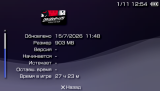
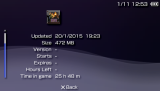
About Ingame Time Counter
The game plugin records the play time of each session in games and PS1 games, and the XMB plugin shows the total. Since 1.2.0 it's an extra line on the game's Information screen, in the system's own font, as hours and minutes (12 h 34 m, or 12 ч 34 м with the system language set to Russian). Only games with a record show it.
Games are told apart by their DISC_ID. Time is saved when you quit through the HOME button, so a crash or a forced exit loses that session. Time in sleep mode doesn't count. Each game takes 32 bytes in ms0:/seplugins/ingame_timecounter_stats.bin.
The _xmb plugin is for the XMB only, and the _game plugin for games and PS1 games only. The developer has run them on a PSP-3000 with ARK-4 on 6.61, alongside Game Categories Lite, XMB Item Hider and XMB Item Manager. Earlier releases also came with macOS tools to view and edit the stats file.
Release notes
v1.2.0 · IngameTimeCounter PSP Plugin 1.2.0 - переезд отображения в раздел Информация · Nov 1, 2026
GAME-версия не менялась с предыдущего релиза.
В рамках XMB-версии показ статистики переехал из PIC0/1-превью экрана в экран раздела "Информация" выбранной игры. Отображение отныне выполнено в нативном стиле системы (родным шрифтом) дополнительным пунктом в общем списке свойств.