

ArcSync for PSP v0.1-alpha by Rezerv-EM
Browse your ArcSync game library on the PSP, start PC games from it and stream them back over Wi-Fi with the PSP as a controller
Install on your PSP
Archive: extract ArcSyncCast-PSP-0.1-alpha.zip. It is laid out from the root of the Memory Stick: copy it there, so you have /PSP/GAME/ArcSyncCast/.
Start it from Game › Memory Stick. On a PSP Go without a Memory Stick, use /PSP/GAME/ on the internal storage.
Files
| File | Size | SHA-256 | |
|---|---|---|---|
| ArcSyncCast-PSP-0.1-alpha.zip | 591 KB | a834d2ab…af01 | Download |
Screenshots
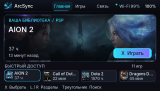
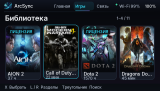
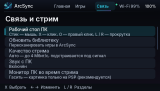
About ArcSync for PSP
An add-on for ArcSync, Rezerv-EM's game launcher for Windows. The PSP shows the ArcSync library with covers, play time, recent games and search. Starting a game runs it on the PC, and the picture comes back as H.264, decoded by the PSP's hardware. The PSP acts as an Xbox 360 controller, with Select combinations for the triggers, the right stick and the Guide button. On the PC desktop the analog stick moves the mouse and Cross and Circle click.
It needs ArcSync 0.1.5 or newer on the PC, which comes with the PSP server, custom firmware 6.60 or 6.61 (PRO or ME) and a 2.4 GHz Wi-Fi network. The PSP is paired with the PC once, by running a command on the PC. The interface is in Russian.
- L + R + Select: on-screen stats (frame rate, bitrate, decoding)
The author calls it an alpha. It's free to use under the ArcSync EULA, and its source is private.
Release notes
v0.1-alpha · ArcSync for PSP 0.1 alpha · Nov 5, 2026
ArcSync for PSP 0.1 alpha
First public alpha — an add-on for ArcSync 0.1.5 or newer on Windows.
- PSP with custom firmware 6.60/6.61 (PRO or ME), 2.4 GHz Wi-Fi b/g.
- Unzip to the memory stick root (
PSP/GAME/ArcSyncCast) and pair once as described in the README. - The zip does not contain any pairing file.
Download ArcSyncCast-PSP-0.1-alpha.zip and compare it with the attached SHA256SUMS.txt:
certutil -hashfile ArcSyncCast-PSP-0.1-alpha.zip SHA256
This is an alpha: expect rough edges and report problems in Issues. Screenshots and setup steps are in the README.