

ZhiThemes v0.1.0-alpha by Zhi
Themes for the real PS5 home screen: game folders, tall covers, video wallpapers, your own font and top bar, edited live from a browser
Install on your PS5
Payload: start elfldr 0.25 or newer on the PS5 first. It listens on port 9021. Then press Send to PS5 beside the file under Files, on a computer or phone on the same network. elfldr downloads the payload and runs it, so the PS5 needs to be online.
Files
| File | Size | SHA-256 | |
|---|---|---|---|
| ZhiThemes.elf | 9.4 MB | 379dd037…c8fe | Send to PS5 Download |
Screenshots


About ZhiThemes
ZhiThemes changes the PS5's own home screen, Settings and Trophies while they load. Nothing on disk is changed: it all happens in memory, and a reboot without the payload gives you the stock look back. Your themes, pictures and logs are kept in /data/ZhiThemes/.
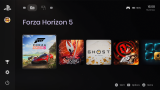
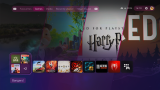
A theme can add game folders to the home row, switch to 2:3 covers or square tiles with a wide tile for the focused game, and give any game its own cover, background and logo, from your files or a SteamGridDB search. It can play a picture or an .mp4 behind the home screen, change the system font without a reboot, and rework the top bar with extra tabs and Power, Trophies and controller battery buttons. There are 23 particle styles too.
Send ZhiThemes.elf to your ELF loader with kstuff running. Open http://<PS5-IP>:4444 on a PC or phone, change something and press Apply: the home screen reloads in a few seconds. It starts switched off, so nothing changes until you do that. Options on any home tile opens a ZhiThemes menu to switch themes, install .ztheme files from USB and back them up. After a reboot, send it again or add it to autoload.
Don't load it with etaHEN, OnionHEN, AniketosHEN or other tools that load into the home screen: two of them crash it, so ZhiThemes won't start next to them. After two home screen crashes within three minutes it turns the theme off by itself, and an empty file ZhiThemes/no_theme on a USB drive keeps it off. The author calls it an alpha. The developer lists firmware 9.60 and 13.60. Nine ready-made themes are on the developer's GitHub release as ZhiThemes-themes.zip.
Release notes
v0.1.0-alpha · ZhiThemes 0.1.0-alpha · Nov 12, 2026
The first public version of ZhiThemes 🎨
Custom themes for the real PS5 Home. Not an app, not a mockup: your actual ShellUI, with your games, your folders (yes, folders), Settings and Trophies.
No system files are changed. Everything runs in memory. Reboot without the payload and your PS5 is 100% stock again.
This is an alpha. Made on firmware 9.60 and confirmed working on 13.60. Other firmwares are untested, so if you try one, please send a debug log.
Highlights
- 📁 Game folders on the Home, built from scratch. Mosaic, stacked covers or icons, each with its own name, icon and background.
- 🖼️ Vertical 2:3 covers or square tiles, and a Steam-style wide tile for the focused game.
- 🎮 Your own covers, backgrounds and logos per game, with SteamGridDB search built into the editor.
- 🎞️ Animated covers and backgrounds: the focused game moves, and animated backgrounds can be found on motionbgs.com.
- 🌌 Video wallpapers that keep playing behind Settings and Trophies, plus 23 particle styles.
- 🔤 Your own system font, applied without a reboot.
- 🧭 A new top bar: tab icons, Recently played / Favourites / Never played tabs, and Power, Trophies and controller battery buttons. Put them anywhere, even in a side bar.
- ⚙️ Settings and Trophies follow your theme too.
- 🌐 Live web editor on your PC or phone: drag things on a picture of your Home, press Apply, see it on the TV in seconds.
- 📦 Share themes as one
.zthemefile and install them from a USB drive, right from the Home. - 🎨 ZhiThemes menu in every tile's Options: switch themes, quick settings, back up to USB, go back to PS5 default. No editor needed.
Install
- Download
ZhiThemes.elfbelow. - Send it to your ELF loader (kstuff + an ELF loader such as elfldr), like any other payload.
- Wait for "Welcome to ZhiThemes … Open <PS5-IP>:4444".
- Open
http://<PS5-IP>:4444in a browser on your PC or phone, change something and press Apply.
The first time, ZhiThemes starts off: your PS5 looks stock until you press Apply or install a theme. After a reboot, send the ELF again (or add it to your autoload). Your themes stay saved in /data/ZhiThemes/.
Full guide: README · docs/INSTALL.md
Ready-made themes
ZhiThemes-themes.zip below has 9 themes ready to use: SilverMoon, KindaSelene, CleanWaves, CleanWaves Vertical, LavaLampPurple, ProjectClean, SteamDik, RoundAround and sharpcorners. Use them as they are, or as a starting point for your own.
- Extract the zip to the root of a USB drive (it makes
ZhiThemes/Themes/). - Plug it into the PS5, press Options on any game and open 🎨 ZhiThemes > Themes.
- Pick one under Install from USB.
The -Banned themes are for consoles that are always offline: they hide PS Store, PS Plus, the online parts of the Home and the bottom of the game hub. Previews of all of them are in the README.
Before you start
- Don't load it together with other HENs that also load into the Home (etaHEN, OnionHEN, AniketosHEN, Yoncore, kylin-core, wmdw-jwm, CheatRunner). Two of them in the Home crash it, so ZhiThemes won't load and tells you why. Use kstuff + an ELF loader only.
- If a theme ever breaks the Home, safe mode turns it off after two crashes. An empty file
ZhiThemes/no_themeon a USB drive also keeps it off while the drive is in. - Loading ZhiThemes many times in a row without restarting can fill the Home's memory. From the 4th load the welcome message asks you to restart.
- Found a bug? Open an issue with your firmware and the log from the editor's Logs tab.
Everything that's in this version: CHANGELOG.md
Support
ZhiThemes is free. If you like it, you can buy me a coffee on Ko-fi ☕
SHA256
379dd037d539df59515309d388bf39fab9a4bf5eabe13642e21c946e5930c8fe  ZhiThemes.elf
857fb916455eefe293d303e37759d8732715179f40a5b78e0409f566473a5af4  ZhiThemes-themes.zip
Not affiliated with or endorsed by Sony Interactive Entertainment. Use at your own risk.