

Veda Hub v0.2.0 by DevVeda
Background payload that signs in to RetroAchievements once and shares the session with your PS5 homebrew, with a profile page in the Media tab
Install on your PS5
Payload: start elfldr 0.25 or newer on the PS5 first. It listens on port 9021. Then press Send to PS5 beside the file under Files, on a computer or phone on the same network. elfldr downloads the payload and runs it, so the PS5 needs to be online.
Files
| File | Size | SHA-256 | |
|---|---|---|---|
| vedahub.elf | 8.2 MB | e911047a…ee23 | Send to PS5 Download |
Screenshots

About Veda Hub
The successor to the developer's RA Hub. Sign in to RetroAchievements once for each PS5 profile, and homebrew emulators and games get that session from Veda Hub on the console, so they don't ask for your password. Only the session token is kept, never the password.
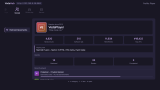
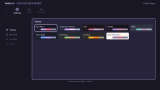
Its page sits in the Media tab as Veda Hub, in an XMB style with nine colour themes, and also at http://<PS5 address>:8045 from a phone or PC. It shows your points, rank, what you're playing, awards, recent games and achievements. For that overview, add your Web API key from your RetroAchievements settings. The page uses plain HTTP, so on a network you don't trust, sign in on the console.
For apps without TLS of their own it passes RetroAchievements requests on over HTTPS, hands out achievement badges, and serves Game Boy, Color and Advance cheat files from libretro-database, which the developer's GB5 emulator uses. A room bus for online play is in place for emulators, but none uses it yet.
It needs Payload Manager. Copy vedahub.elf to /data/pldmgr/payloads/local/vedahub/ over FTP and start it there, or add the developer's repo.json as a source in Payload Manager to install and update it from there. Coming from RA Hub, it closes RA Hub and takes over your session.