

Twispero v1.1.0 by unicxrn
Twitch client: live streams with chat, past broadcasts and clips, decoded by the PS5's own hardware
Install on your PS5
App folder (.zip): unzip PPSA99474.zip and copy the PPSA99474 folder to /data/homebrew/ on the PS5, over FTP or from a USB drive. Some apps also need their title ID added to etaHEN's app list: the release notes say.
Files
| File | Size | SHA-256 | |
|---|---|---|---|
| PPSA99474.zip | 15.2 MB | dc5bdad0…a3d4 | Download |
Screenshots



About Twispero
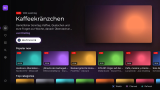
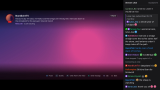
Live streams, past broadcasts, highlights and clips, in any quality the stream has, down to audio only. Chat goes next to the video, over it, or off, with emotes, badges and name colours, and 7TV, BetterTTV and FrankerFaceZ emotes show up too. Videos have a timeline and pick up where you stopped. There's Home, Browse, categories, Search, and channel pages with the schedule.
Watching and reading chat need no Twitch account, and no PSN. Log in with a QR code to see who you follow, get a note when they go live, chat and make clips.
It needs etaHEN with kstuff, and ShadowMountPlus. The developer lists firmware 13.60. Login and settings are kept in /data/ps5twitch. Close it from the PS button menu like a game, or with Quit in the side menu (press Left at the start of a row).
It can't claim channel points, follow channels or play chat replays. If Twitch plays an ad, the picture can freeze until the stream comes back.
Watching and reading chat need no Twitch account, and no PSN. Log in with a QR code to see who you follow, get a note when they go live, chat and make clips.
It needs etaHEN with kstuff, and ShadowMountPlus. The developer lists firmware 13.60. Login and settings are kept in /data/ps5twitch. Close it from the PS button menu like a game, or with Quit in the side menu (press Left at the start of a row).
It can't claim channel points, follow channels or play chat replays. If Twitch plays an ad, the picture can freeze until the stream comes back.
Release notes
v1.1.0 · Twispero 1.1.0 · Oct 19, 2026
Twispero 1.1.0 puts a live picture on Home, adds a stream language filter and chat replies, and fixes a crash when closing from the PS button menu and sound and picture drifting apart.
New
- Home's top stream plays live in its picture, without sound. Press X to watch it. It stops after 90 seconds without a button press, and Settings > Twitch can turn it off.
- Pick a stream language with L1 and R1 on Browse or on a category's Live tab. Home's Popular now row and every category's live streams follow it.
- Reply to a chat message. L1 pauses chat on the newest message, Up and Down pick another one, and L1 again opens the keyboard. This needs a Twitch login.
- Audio only for live streams in the quality menu (R2)
Fixed
- Closing the app from the PS button menu while something played could crash the console. The app now stops drawing the moment the PS5 takes over, which happens before the close goes through.
- Audio and video drifting apart after the stream buffers on a slow connection (#1). Thanks to jumboz95 for reporting it.
- A blank line where a title is all Japanese, Korean or Chinese. The app still can't show those characters, so it skips the line now.
- Twitch's "processing" picture on a past broadcast that's still being recorded. It shows the live picture now.
Known issues
- Channel points, and following or unfollowing a channel, aren't possible; Twitch only allows them in its own apps
- No chat replay on videos
- If Twitch plays an ad, the picture can freeze until the stream comes back
- Emoji and Chinese, Japanese and Korean characters are left out of names and titles
- Only tested on firmware 13.60
Install or update
- You need a jailbroken PS5 with etaHEN, kstuff and ShadowMount+
- homebrew.page and ProsperoStore offer the update, or unzip PPSA99474.zip and copy the PPSA99474 folder to /data/homebrew on the console
- Your login and settings stay where they are
- Close the app from the PS button menu like any game