
Signal Companion v00.006.000 by Marice
Homebrew app to pick the PS5's light colour, edit ps5-signal's startup tune, and start or update the payloads that go with it
Install on your PS5
App folder (.zip): unzip PPSA69426.zip and copy the PPSA69426 folder to /data/homebrew/ on the PS5, over FTP or from a USB drive. Some apps also need their title ID added to etaHEN's app list: the release notes say.
Files
| File | Size | SHA-256 | |
|---|---|---|---|
| PPSA69426.zip | 16.4 MB | b8d03e1d…0343 | Download |
Screenshots
About Signal Companion
The app talks to ps5-signal on the console and carries its own copy, so when the service isn't running it asks whether to start it through etaHEN's ELF loader. L1 and R1 move between the screens, and the touchpad explains the one you're on.
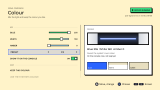
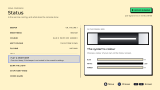
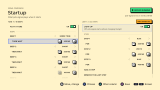
Status says what the light and the beeper are doing, plays a test beep or blink, and can add ps5-signal to ps5-autoloader's list. Colour has blue, white and amber sliders, presets and up to six mixes of your own, and the light can follow the sliders while you try them. Keep this colour saves it. Startup edits the tune, up to 24 beeps, and the light show, up to 24 steps, on a timeline, and Square saves both.
The Payloads screen starts, restarts and updates ps5-exporter, ps5-homeassistant and ps5-signal, puts them in ps5-autoloader's list in order, and sets ps5-homeassistant's MQTT broker and power buttons. With itsPLK's pldmgr running, updates come from the developer's catalogue through pldmgr. A Support screen has a Ko-fi QR code.
It needs etaHEN, and adding to ps5-autoloader also needs etaHEN's Allow /data in sandbox. The developer lists firmware 13.60 on a PS5 Pro.
Release notes
v00.006.000 · Nov 3, 2026
Added
- Support screen, after Payloads: a QR code to Ko-fi, for those who'd like to buy me a coffee or a beer. It works without ps5-signal as well.