
PSXS5 v2.2.0 by SynoPiia
PlayStation emulator with Beetle PSX HW at up to 16x on the GPU, SwanStation and PCSX-ReARMed, a cover-flow shelf, RetroAchievements and save states
Install on your PS5
App folder (.zip): unzip PSXS5-v2.2.0.zip and copy the PPSA97510 folder to /data/homebrew/ on the PS5, over FTP or from a USB drive. Some apps also need their title ID added to etaHEN's app list: the release notes say.
Files
| File | Size | SHA-256 | |
|---|---|---|---|
| PSXS5-v2.2.0.zip | 17.5 MB | 8904a734…af60 | Download |
Screenshots

About PSXS5
PSXS5 runs PS1 games as a home-screen app (PPSA97510) with three emulators inside: Beetle PSX HW (Mednafen), drawn through Vulkan at up to 16x the PS1's resolution with PGXP, SwanStation, and PCSX-ReARMed on the CPU, which needs no BIOS. Emulator: Automatic uses Beetle when your BIOS for the game's region is there and PCSX-ReARMed when it isn't, and all three share one memory card per game. It reads .cue/.bin, .chd, .pbp, .iso, .img, .mdf, .ccd and .m3u.
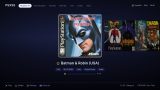
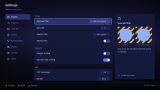
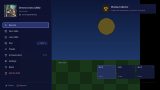
Games sit on a 3D cover-flow shelf in one of five themes, with covers matched by each disc's serial and downloaded on the console, or your own pictures. There are ten save state slots per game with pictures, quick resume, rewind and fast forward, up to four players through a multitap, the DualSense as a GunCon or Justifier light gun, adaptive triggers in racing games, profiles, .ppf fan translations, a memory card manager, xBR and Scale2x upscaling and CRT looks. RetroAchievements work, hardcore mode included, and cheats download per game. A settings page opens on your phone from a QR code, and Settings, About installs new releases from GitHub.
No BIOS files or games are included: bring your own. It needs etaHEN with kstuff and ShadowMountPlus. Copy the PPSA97510 folder from the zip to /data/homebrew/ and set its permissions to 777, subfolders included, or the console says it can't start the app (CE-107750-0). The PC tool in the zip, tools/psxs5_sync.py, does that for you and also uploads games, covers, cheats and your BIOS. Start PSXS5 once so it makes /data/PSXS5/, then put each game in its own folder under /data/PSXS5/games/, or in PSXS5/games/ on a USB drive. A BIOS goes straight in /data/PSXS5/bios/ as scph5500.bin, scph5501.bin or scph5502.bin.
To see the games folder it needs /data unlocked by LegacyJB, etaHEN's Legacy CMD server (port 9028) or the PS5SX2 Helper with PSXS5 on its list. Without that it only shows the games in /data/PSXS5/library.txt, which the PC tool writes. Text entry, like the RetroAchievements sign-in, happens on the PC or the phone page. The author warns that closing it from the PS button crashed the console once while /data was unlocked through etaHEN. The developer works on firmware 13.60.
- Options: PS1 Start, touchpad tap: Select
- Hold the touchpad, or L3 + R3: the PSXS5 menu
- Touchpad held + R2 or L2: fast forward or rewind
- Touchpad held + R1: next disc
Release notes
v2.2.0 · PSXS5 2.2.0 · Oct 9, 2026
PSXS5 2.2.0: SwanStation as a third emulator, games from USB drives, a smooth boot intro, and a long list of fixes from testers.
SwanStation
- A third emulator (Settings → System → Emulator): SwanStation, libretro's fork of DuckStation, drawing with Vulkan and running its fast CPU recompiler. Your settings (internal resolution, PGXP, true colour, anti-aliasing, texture filtering, fast CD loading, widescreen, overclock...) apply to it too, and it uses the same memory card as the other emulators, so your saves follow you. Thanks to darkxex's SwanStationPS5 port, which PSXS5 builds on.
- Save states say which emulator made them. Each emulator has its own state format; loading a state made by another one now tells you which, instead of calling the slot empty.
Games on USB drives
- Games are found in
PSXS5/,PSXS5/games/ordata/PSXS5/games/on any USB drive or extended storage, in every format PSXS5 reads (CHD, CUE/BIN, PBP, ISO, IMG, MDF, CCD, M3U). - The BIOS is taken from
PSXS5/biosordata/PSXS5/bioson the drive when the console'sbiosfolder has none.
New options
- Run-ahead (1 or 2 frames): less input lag.
- NeGcon analog gas and brake on R2 / L2 for NeGcon racing games, and the touchpad as a PlayStation Mouse for mouse games.
- PS1 startup intro: the white Sony screen and the PlayStation logo, as on the real console.
- Disc launch animation: the disc slides out of its case and spins up when a game starts (it can be switched off).
- Sharpening, true colour (32-bit, no dot pattern), smooth video colours for FMV, and faster screen effects (Beetle).
- RetroAchievements sign-in from the phone page. Your password goes to retroachievements.org only; PSXS5 keeps the sign-in token.
- Settings tabs across the top, switched with L1 / R1.
Fixes
- The boot intro and screen effects show properly with Beetle. The white Sony screen froze and jumped between old pictures, and effects drawn straight to the screen (Final Fantasy VII's battle swirl) didn't show.
- No more stall when a game switches video modes (the white Sony screen to the PlayStation logo, menus to gameplay): Beetle's renderer was rebuilt each time, for seconds at high internal resolutions.
- Effects compile once. Beetle's shader cache is saved, so a new effect only stutters the first time it's seen.
- Save states work in Final Fantasy VII and other big games: rewind now keeps Beetle's real state size (about 4 MB, not 16 MB), which left too little memory to save.
- No black screen while a game loads: the disc keeps spinning with "Loading...".
- Fast CD loading no longer breaks video sound: the disc is read at normal speed while a video plays.
- Disc changes register: the lid stays open for a moment, so games like Final Fantasy IX notice the new disc.
- Supersampling is done by PSXS5 at the screen's resolution (it flickered before).
- Resume no longer presses Cross in the game.
- Gran Turismo and other stick games start in analog mode with Beetle, and stay analog when an older save state is loaded.
- CHD, MDF and CCD games get their serial, so region and covers work. Covers can also be found by name when a disc's serial is unknown, and every downloaded cover is listed in the cover picker.
- Multi-disc games lying loose in the games folder are one game on the shelf. A playlist made on a PC is ignored when its discs aren't beside it.
PC tool (tools/psxs5_sync.py)
- Every disc of a multi-disc game is copied, whether the discs lie loose or sit in one folder (or archive) per disc.
- Progress within each file, and the copy speed.
- The working folder is
PSXS5_readybeside your games (same drive, so games are linked rather than copied), and disc images are removed from it once uploaded. - It no longer assumes a drive letter.
Updating
From 2.1.1 or later: Settings → About → Check for updates. From 2.0: install by FTP once (copy the PPSA97510 folder to /data/homebrew/), as its updater can't start new versions.