

PStube v0.20 by leetlamer
YouTube client with Google sign-in, subscriptions, SponsorBlock and DeArrow, decoded in software on the console and started through websrv
Install on your PS5
Homebrew for websrv (.zip): unzip PStube-PS5-Test-v0.20.zip and copy the PStube-PS5-Test folder to /data/homebrew/ on the PS5, over FTP or from a USB drive. Then load websrv (websrv-ps5.elf) with an ELF loader, open http://PS5:8080 in the PS5's browser or on a phone, with your PS5's address in place of PS5, and start it from the list.
Files
| File | Size | SHA-256 | |
|---|---|---|---|
| PStube-PS5-Test-v0.20.zip | 57.4 MB | bd61e9be…c81a | Download |
Screenshots

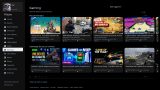

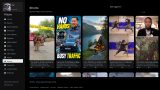
About PStube
Browse YouTube's Home, Gaming, Live and Shorts with the controller, in grids of four. Sign in with Google through a code or QR code for subscriptions, playlists, history and liked videos, and keep several accounts. SponsorBlock skips marked segments, DeArrow can swap titles and thumbnails, and seeking shows storyboard previews when YouTube has them.
Video is decoded in software on the console, with no PC in between. The developer recommends 1080p: 4K and live streams are experimental, and HDR, hardware decoding and refresh rate switching aren't in yet. Settings, Playback has four buffer presets, and the app has DNS and proxy settings of its own.
It needs OnionHEN and websrv (the Homebrew Launcher), both from the Payload Manager. Copy the whole PStube-PS5-Test folder to /data/homebrew/ and launch eboot.elf through websrv. The developer lists a PS5 Pro on firmware 13.00 with OnionHEN 0.9.0 and websrv 0.34, and suggests NanoDNS or similar.
- L1 / R1: previous or next video
- L2 / R2: seek 30 seconds back or forward, 60 after two seconds held
- D-pad: seek 10 seconds
- Cross: confirm a seek, Circle: cancel
- Options: exit
Release notes
v0.20 · PStube PS5 Beta 0.20 · Nov 13, 2026
An ad-free YouTube experience for PlayStation 5. Tested on PS5 Pro firmware 13.00 with OnionHEN 0.9.0 and websrv 0.34.
Changes
- More responsive playback cancellation during network/audio waits and safer audio cleanup at video end.
- Automatic video-card metadata, corrected creator names and sidebar icon clipping.
- Four-column Subscriptions, History and Liked Videos.
- Centered loading spinner and clean paused-overlay redraws.
- Optional storyboard seek previews plus accelerated L2/R2 seeking.
- Updated source, documentation and actual console screenshots.
Install
Exit PStube, extract the install ZIP, and copy the complete PStube-PS5-Test folder to /data/homebrew/. Launch eboot.elf using websrv with OnionHEN active. Preserve existing accounts/settings in /data.
The ZIP is the installation download. The source/relink archive is for developers; browsable source and documentation are on main. SHA256SUMS verifies the two archives.
Verification and limits
Host UBSan checks and ELF/package validation passed. Final console playback: 1080p60 VP9/Opus, 600/600 frames displayed, zero sync drops or PCM underruns; seek previews and account-grid layouts verified. Broader long-session testing remains necessary.
1080p is recommended. Higher resolutions and live playback remain experimental and source-dependent. Software decoding is used; HDR output, hardware decoding and HDMI refresh switching are not implemented. Seek previews require available storyboards. Missing counts are not fabricated.