

PShare v1.0 by StonedModder
Sends your PS5 screenshots and clips to Discord, Telegram, file hosts, USB or a PC share as you take them, with a capture gallery and clip player
Install on your PS5
App folder (.zip): unzip PPSA99773.zip and copy the PPSA99773 folder to /data/homebrew/ on the PS5, over FTP or from a USB drive. Some apps also need their title ID added to etaHEN's app list: the release notes say.
Files
| File | Size | SHA-256 | |
|---|---|---|---|
| PPSA99773.zip | 27.2 MB | a9a07cde…e807 | Download |
Screenshots

About PShare
Take a screenshot or save a clip with the Create button and the background uploader, pshared, sends it on, also after you close the app. It sends to Discord webhooks, Telegram bots, catbox.moe, Litterbox, Uguu, tmpfiles.org, temp.sh, x0.at, Gofile, any multipart HTTP endpoint, a USB drive or console folder, and PC shares over SMB 2 or 3. Each game can have its own destination, and a size limit can send big clips to a file host and the link to Discord.
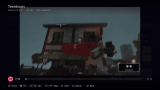
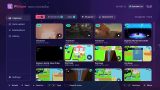
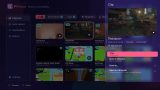
It's a gallery too: every capture with thumbnails, filtered by type or by game, and a full-screen clip player with sound, whose buttons match VLC for PS5. While PShare is open, any capture can be opened, streamed or downloaded in a browser on the same network, and the setup page lets you paste webhooks and tokens from your phone. Every upload goes in a history with its link as a QR code, and failed ones can be sent again.
Copy the PPSA99773 folder from the zip to /data/homebrew/ and start PShare from the Media area. It needs the ELF loader on port 9021, which it uses to send its own Lapy helper and start pshared. Settings are in /data/pshare/config.ini.
After some console restarts the background uploader reads clips as empty while the app can still read them. Keep PShare open then, or load the jailbreak again.
Release notes
v1.0 · v1.0 welcome to pshare · Oct 10, 2026
PShare sends your PS5 captures where you want them, the moment you take them. Take a screenshot or save a clip with the Create button and PShare sends it to Discord, Telegram, catbox.moe, a USB drive, a shared folder on your PC or a dozen other places, automatically and in the background, even after you close the app. It doubles as a media gallery: browse every capture by game, watch clips with sound, and open anything on your phone from a QR code
Features
- Automatic uploads. A small background uploader, pshared, notices each new screenshot and clip, waits until a clip has finished writing, and sends it. It keeps running after PShare closes.
- Many destinations. Discord webhooks, Telegram bots, catbox.moe, Litterbox, any multipart HTTP endpoint, a USB drive or console folder, and PC shares over SMB 2/3. Account-free hosts (Uguu, tmpfiles.org, temp.sh, x0.at, Gofile) are set up out of the box.
- Smart routing. Per-game destinations, size limits with fallbacks (a 40 MB clip goes to catbox and Discord gets the link), and destinations that receive every capture as well, such as a copy on a USB stick.
- Media gallery. Every capture with thumbnails, clips included, filtered by kind or by game (picked from the games you actually have captures of, named even when the game is a PS4 title or no longer installed), newest or oldest first. A check marks what has already been sent.
- Clip player. Full screen with sound, using FFmpeg (VP9, H.264, HEVC, AV1 with Opus or AAC), including the PS5's own recordings. Its buttons match VLC for PS5.
- Phone and PC. While PShare is open, any capture can be opened in a browser on the same network with the same controls, and the whole gallery can be browsed, streamed and downloaded. The setup page lets you paste webhooks and tokens from your phone instead of typing them with a controller.
- History with QR codes. Every upload, from the app or the background, with its link as a QR code to open on your phone. Failed ones can be retried