

PSCord v01.000.010 by desstannsoftware
Unofficial Discord client with servers, DMs and voice channels, drawn like the desktop app, signed in with a QR code
Install on your PS5
App folder (.zip): unzip PPSA99190.zip and copy the PPSA99190 folder to /data/homebrew/ on the PS5, over FTP or from a USB drive. Some apps also need their title ID added to etaHEN's app list: the release notes say.
Files
| File | Size | SHA-256 | |
|---|---|---|---|
| PPSA99190.zip | 30.3 MB | 6c92a0c5…6faf | Download |
Screenshots


About PSCord
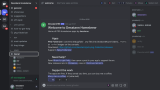
Servers with unread and mention badges, channels, the member list with role colours, and direct messages. Messages show markdown, replies, reactions, embeds, GIFs, stickers, custom emoji and attachments. Square opens the on-screen keyboard and R1 sends.
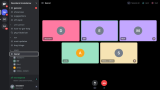
Voice channels work with a headset mic, Discord's end-to-end encrypted calls included. On the call screen R2 mutes and Triangle leaves. If the console suspends the app, it joins the call again when Discord reconnects. Sign in by scanning a QR code with the Discord mobile app, and the token stays on the console.
It has its own way round DNS and SNI blocking of Discord, inside the app, with no proxy and no changes to the console. It looks for a new version at each launch and updates itself. Menus are in English and Turkish.
Extract PPSA99190.zip and copy the PPSA99190 folder to /data/homebrew/, and PSCord shows up on the home screen with your other apps. The author says Discord's terms don't allow third-party clients, so use it at your own risk.
Release notes
v01.000.010 · Oct 28, 2026
Gateway connect timeout with clear errors; Cross retries, Circle logs out. Chat Send on R1.