

PS5X360 v1.0.2 by BrinooTk
Xbox 360 emulator for the PS5 built on Xenia Canary, with a dashboard-style home screen, DLC and title updates, online play through Xenia's server and Kinect by phone
Install on your PS5
Payload: start elfldr 0.25 or newer on the PS5 first. It listens on port 9021. Then press Send to PS5 beside the file under Files, on a computer or phone on the same network. elfldr downloads the payload and runs it, so the PS5 needs to be online.
Files
| File | Size | SHA-256 | |
|---|---|---|---|
| PS5X360-Helper.elf | 1.2 MB | 4a025032…7b59 | Send to PS5 Download |
Screenshots

About PS5X360
Xenia Canary ported to the PS5 as a home-screen title, with the DualSense as the Xbox pad, native sound and Vulkan graphics through RADV. The home screen follows the Kinect-era Xbox 360 dashboard: the last game played comes first, then a library of covers, the player and the achievements. A game's own system windows (sign-in, saves, messages, the keyboard) show on screen, and the touchpad opens a guide with resume, the library, settings and exit.
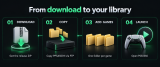
No games, keys or Microsoft files are included. Copy the PPSA50011 folder to /data/homebrew/ over FTP, let ShadowMountPlus register it, and put each game in its own folder under PPSA50011/assets/roms/: an extracted game with its default.xex, an .iso, or a GOD or STFS package with its data folder. More folders, USB drives among them, can be added in Settings. DLC and title updates install from the game's sheet, and games on more than one disc are supported. A dash.xex from your own console can be opened from the home screen.
Per-game settings and the community Xenia patches are matched to the game's version. There's experimental online play through Xenia's public server, System Link on your home network, FSR3 frame generation, FSR upscaling, and Kinect through a phone camera or a USB Kinect, also experimental.
PS5X360-Helper.elf goes in etaHEN's autoload folder. It updates the emulator from GitHub, keeps the Kinect tracker running and sends game logs to the developer. The developer's own setup is firmware 13.60 with etaHEN, ShadowMountPlus and kstuff. The author says compatibility varies by game and to expect crashes, graphics errors and uneven speed in some titles.
Release notes
v1.0.2 · PS5X360 v1.0.2 - Online play fixes, Content Installer for Windows and Helper 1.3.0 · Oct 22, 2026
PS5X360 v1.0.2
Online play now gets past the start on the PS5, the emulator speaks every language it lists, a dark
theme, a Windows app that installs DLC and title updates over the network, and the Helper 1.3.0.
Compatibility keeps improving, but results depend on the game, firmware and homebrew setup.
Online play (experimental)
Turn it on in the home screen's Online channel ("Online: LIGADO"). Use the game's Xbox LIVE
menu to play with people far away: System Link only finds games on your own home network.
- Requests to the Xenia server no longer hang. Closing each request took 55 seconds on the PS5 (the console ignored "do not wait" on its sockets), so games gave up with "Cannot reach API server". It now takes under a second.
- Call of Duty: Modern Warfare 2 no longer stays on a black screen at start with online on. A request sent without data made the network library wait for keyboard input that never comes on a console. MW2 now reaches its menu and searches Xbox LIVE matches through the Xenia server.
- Requests to the server have time limits (10 s to connect, 30 s in all), so a server that does not answer can no longer freeze a game, and each request is written to the game's log with its result and time.
- Games' own non-blocking sockets now really do not wait on the PS5.
- Router ports: the PS5 does not let programs use ports below 1024, so a game's port 1000 is opened as 11000 on the console. The automatic router request (UPnP) now asks for the game's port towards the real one (1000 to 11000). Many routers refuse ports below 1024 that way (
UPnP error code 501in the log); then add the forwarding rules by hand on the router, UDP, to your PS5's address: 1000 to 11000, 1001 to 11001, 1013 to 11013 (MW2's; the log'sXSocket::Bindlines show each game's).
Checked on a PS5: Halo 3 online (sessions, connection checks, leaderboards) and MW2 searching
and finding other players' Xbox LIVE matches. Not confirmed yet: joining and playing a whole match
with other people. Please send the game's log from PPSA50011/logs with your results.
The PPSA50011 folder can be deleted again
Since v0.6.0 the phone camera's certificate folder, PPSA50011/phone-camera, was made readable
only by the emulator, so FTP and file managers said "Permission denied" and the PPSA50011 folder
could not be deleted. Now it is made open, and starting this version once opens an existing one.
You never need to delete the old folder to update: copying the new version over it is enough.
Languages and dark theme
- 51 texts of the v1.0 home screen (Online channel, search, disc tray, theme) were missing in every language and showed in Portuguese; all 16 languages have them now.
- Dark theme: Settings channel > "Tema: CLARO / ESCURO", or the Tema row of the Settings sheet. The emulator restarts in the chosen theme.
New: PS5X360 Content Installer (Windows)
PS5X360-Content-Installer.exe installs Xbox 360 DLC and title updates into PS5X360 over FTP from a
computer, with no Python or other program to install:
- Close PS5X360 on the console.
- Open the app, type your PS5's IP address (PS5 Settings > Network > Connection status) and press Check console.
- Drag the DLC / title update files or whole folders onto the window, then press Install.
It reads each file's Xbox 360 header and refuses anything that is not DLC or a title update (with
the reason), checks that a title update is for the same edition as your game (also inside ISO
images), uploads each file, reads it back and compares its SHA-256 before putting it in place.
It never deletes or overwrites anything: an older title update is moved to 000B0000-off.
Helper 1.3.0
PS5X360-Helper.elf for the etaHEN autoload folder: it updates PS5X360 from this page when a newer
release exists (checking the file's SHA-256 published by GitHub), keeps the Kinect tracker running
and sends game logs as the old Tool did. 1.3.0 shows its notifications in the console's language.
The Helper does not replace its own autoload copy: copy this file over the old one.
Install or update
- With the Helper in autoload: it installs this version by itself at the next start of the console (after PS5X360 is closed).
- By hand: close PS5X360, extract
PPSA50011.zipand copy thePPSA50011folder to/data/homebrew/over the existing one. Games, saves, DLC and settings are kept.
Files
PPSA50011.zip— the emulator (executableb1d1b3cb).PS5X360-Helper.elf— Helper 1.3.0.PS5X360-Content-Installer.exe— DLC and title update installer for Windows.PS5X360-source-1.0.2-changes.zip— source of the changes in this version and the licences of what it links (wolfSSL, libcurl, miniupnpc, Xenia netplay).
Support
If PS5X360 is useful to you, you can support the project on Ko-fi: https://ko-fi.com/brinoblitz