

PS5SD v1.8.5 by Darkatek7
Makes pictures and short videos with stable-diffusion.cpp on the PS5's GPU, driven from a web page on your phone or computer
Install on your PS5
App folder (.zip): unzip PPSA99576.zip and copy the PPSA99576 folder to /data/homebrew/ on the PS5, over FTP or from a USB drive. Some apps also need their title ID added to etaHEN's app list: the release notes say.
Files
| File | Size | SHA-256 | |
|---|---|---|---|
| PPSA99576.zip | 51.0 MB | 90da1213…c35a | Download |
Screenshots

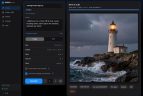


About PS5SD
stable-diffusion.cpp running on the console's GPU through Vulkan. The TV shows a dashboard with the console's address and a QR code for your phone, and the web UI on that address does the rest: text to image, image to image, inpainting, editing a picture by a sentence with FLUX.2 Klein, ControlNet, the hires fix, upscaling, LoRAs, and short videos with Wan 2.1 and 2.2. Every image goes in a gallery with its settings, and Use all loads them again.
No models are included. The web UI downloads them from a starter catalogue (SDXL Base 1.0, FLUX.2 Klein 4B, Z-Image Turbo and a few smaller ones) or from any Hugging Face or Civitai file link, and you can upload your own from a PC or copy them over FTP. A gated Hugging Face model needs a token in /data/PS5SD/hf-token.txt, and a Civitai one that asks for a login needs one in /data/PS5SD/civitai-token.txt. The developer lists an SDXL image in about 30 seconds.
Port 7860 serves the web UI and A1111, OpenAI and sd-server style APIs. They're open to your network until you turn on the API key in Settings. Fan modes let the fan start earlier on long runs, and the TV and the web UI show the console's temperature, power, fan and load.
It needs etaHEN with kstuff-lite, ShadowMountPlus and elfldr on port 9021. Unpack PPSA99576.zip into /data/homebrew/ and let ShadowMountPlus pick it up. Downloads write through ftpsrv on port 2121 when it's running, otherwise through a copy the app carries that only listens on the console itself. The developer lists firmware 13.00.
Release notes
v1.8.5 · PS5SD 1.8.5 · Nov 22, 2026
PS5SD 1.8.5 waits when Civitai limits downloads, fixes the memory hint after a model switch, adds a search to the prompt collections, and keeps showing the steps of a run after its tab was in the background.
Downloads that the server limits (HTTP 429)
Civitai stopped a LoRA at 855 MB with "Too Many Requests". 1.8.4 tried again every few seconds on 16 connections and gave up after about a minute, and the row only showed the bytes.
- All connections of a download now pause together: 30, 60, then 120 s, or as long as the server's Retry-After says (at most 300 s). After seven pauses in a row without progress the download fails.
- A 429 on the first request is asked again three times.
- The row says why it waits: "Civitai limits downloads for now (HTTP 429); trying again in 60 s".
- A failed download says what happened and that Retry keeps what came in.
On the console, the 580 MB LoRA that Civitai limited paused 300 s twice and then finished on its own.
The memory hint under Generate
- It said "Larger than every run since PS5SD started" when it meant "since the model loaded". It now says what it checks.
- It warned at FLUX.3 Klein's own 1024x1024 after a switch from another model. Q6_K at 1024x1024 after Q4_K, the run that failed in 0.7, now runs, so 1024x1024 counts as safe for the family.
- The hint is checked again after each image of a queue, not only when the queue ends.
Search in the prompt collections
- A box above the collections finds them by name and by their entries. All the words you type must match, in any order, each at the start of a word: "red" finds red and reddish, not colored.
- A collection whose name does not match lists only the entries that do, and its chip shows "cosplay (3 of 60)".
- Tick all and Tick none act on the shown collections while you search.
The steps after a tab in the background
The page asked for its job one look at a time. A look that never came back, such as a request the browser held while the tab was in the background, left the page on "Queued…" for good.
- A look now has a time limit, and one that hangs for 15 s is replaced.
- The page looks at once when its tab is shown again.
- While your image waits behind another one, the page shows the one that runs: its step ("Queued · running now: step 14 of 20"), the bar and its live preview. This happens with Random prompt, where each image is sent when the one before is done: images you add to the queue meanwhile line up before the run's next one.
Install
Update from the homebrew store, or unpack PPSA99576.zip into /data/homebrew/ and let ShadowMountPlus scan.