
PS5CLEAN v1.0.0.6 by Yahballon
Fun app that switches the PS5's fan between high and low cooling in timed pulses, in the hope of shaking dust loose, with live temperature and fan readings
Install on your PS5
App folder (.zip): unzip PPSA99338.zip and copy the PPSA99338 folder to /data/homebrew/ on the PS5, over FTP or from a USB drive. Some apps also need their title ID added to etaHEN's app list: the release notes say.
Files
| File | Size | SHA-256 | |
|---|---|---|---|
| PPSA99338.zip | 8.5 MB | 4ea01780…9517 | Download |
Screenshots

About PS5CLEAN
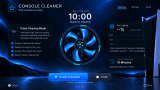
For the first half of each pulse PS5CLEAN asks the fan control for a 20 °C target, for the second half 60 °C, and it repeats until the cycle ends or you press Stop. The default cycle is ten minutes, and the length and pulse interval can be changed in Settings. The console's own fan control still decides the real speed, so the dashboard shows the requested level next to the measured fan duty, with the CPU temperature and a scrolling graph.
The author calls it a fun app and says loosening dust is the hope, not a proven effect. It's no replacement for cleaning the console by hand. The original temperature target comes back when you stop, when the cycle ends, or when something goes wrong, such as the app closing or the temperature passing the limit. Close other fan-control payloads while it runs.
It needs kstuff, ShadowMountPlus or another loader for native apps, and an ELF loader on port 9021, which starts the included fan-service.elf. Copy the whole PPSA99338 folder from the zip to your homebrew folder, for example /mnt/usb0/homebrew/. Settings are kept in /data/PS5CLEAN/settings.ini. The developer lists firmware 5.10.
- L1 and R1: Cleaning, Settings and About
- Left and Right: Start or Stop, or change a setting
- Cross: select
- Circle: back, stop a running cycle, or quit when idle
- Options: stop and quit
Release notes
v1.0.0.6 · Oct 12, 2026
PS5CLEAN Release v1.0.0.6