

PS5 Thermal Doctor v0.2.3 by Jlozde
Background payload that watches temperature, fan speed and power while you play, and tells you when the console needs its dust cleaned
Install on your PS5
Payload: start elfldr 0.25 or newer on the PS5 first. It listens on port 9021. Then press Send to PS5 beside the file under Files, on a computer or phone on the same network. elfldr downloads the payload and runs it, so the PS5 needs to be online.
Files
| File | Size | SHA-256 | |
|---|---|---|---|
| ps5-thermal-doctor.elf | 305 KB | 85515c79…6210 | Send to PS5 Download |
Screenshots
About PS5 Thermal Doctor
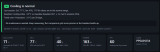
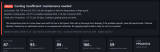
It reads the SoC and CPU temperatures, the fan speed and the power draw together while a game runs, and compares each session with your console's own history. The first five sessions form the baseline. When the game closes, a notification gives the verdict: cooling is fine, keep an eye on it, clean the dust, or get it serviced. Play for at least 15 minutes to get one.
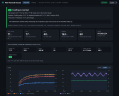
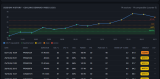
The web page on port 8088 shows the verdict with its reasons, live charts of temperature, fan, power and FPS, and the session history. The thresholds, language, Celsius or Fahrenheit and notifications are set in its Settings tab, and New baseline starts the comparison again after you clean the console. It only reads sensors and never touches the fan or the console's settings. On first start it adds a tile to the media row of the home screen that opens the page. The tile can be turned off, and on firmware 12.00 and later it's skipped.
Send it to etaHEN or elfldr on port 9021 after every restart, or put it in /data/etaHEN/payloads/ and let etaHEN start it. Settings and history are kept in /data/ps5td. The developer lists firmware 11.60, and 4.03 to 14.10 as supported. The author says it gives an estimate, not a diagnosis, so look at the console yourself if it runs hot or loud.
Release notes
v0.2.3 · PS5 Thermal Doctor 0.2.3 · Nov 7, 2026
Know when your PS5 needs cleaning, before it overheats.
PS5 Thermal Doctor watches how hard your console's cooling works while you play and tells you when it is time to clean it.
Türkçe notlar aşağıda.
English
Highlights
- Open it from the PS5 home screen. When the payload starts and the tile is missing, it adds a PS5 Thermal Doctor tile to the media row of the home screen, next to the other apps. Selecting it opens the web UI in the PS5 browser, so you no longer need a phone or PC to see the verdict.
- A logo. A fan with a pulse line across it. It is on the tile, in the browser tab, in the web UI header and in the README.
- You decide. The tile can be turned off in the Settings tab (Home screen tile,
home_tile = 0). The Maintenance card shows whether the tile is there.
Good to know
- The tile holds no program. The payload still has to be sent after every console restart; the tile only opens the page.
- It is added the same way other homebrew launchers do it:
param.json(media row,"applicationCategoryType": 65536) andicon0.pnggo to/user/app/FAKE08088/sce_sys/, and the system registers that folder withsceAppInstUtilAppInstallTitleDir. The batch install call, which would also pick up other titles waiting under/user/app, is never used. - To remove the tile, turn the setting off first, then delete the tile on the PS5. With the setting on, a deleted tile comes back at the next start.
- The tile opens the web UI port (8088 by default). If you change
http_port, the tile is registered again with the new port at the next start. - Firmware 12.00 and later no longer offer the per-title install call. There the tile is skipped and the Settings tab says so.
/api/statushas newtile,tile_code,tile_portandtile_wantfields.
Install
- Download
ps5-thermal-doctor.elfbelow. - On a jailbroken PS5 with etaHEN or elfldr running, send it to port 9021:
powershell -ExecutionPolicy Bypass -File .\tools\send_payload.ps1 -Ip <PS5 IP> -Elf .\ps5-thermal-doctor.elf
On Linux or macOS: nc -q0 <PS5 IP> 9021 < ps5-thermal-doctor.elf
- Open
http://<PS5 IP>:8088on a phone or PC, or select the new PS5 Thermal Doctor tile on the PS5. Play for at least 15 minutes; the verdict arrives when the game closes.
Settings and history under /data/ps5td are kept. If an older version is running, sending 0.2.3 stops it automatically.
Notes
- Tested on a PS5 with firmware 11.60: the tile was registered on the first start and recognised on the following starts without being added again. The SDK supports firmware up to 14.10.
- This ELF was built by GitHub Actions with ps5-payload-sdk v0.45 and clang 18. Check it against
SHA256SUMS.txt.
Disclaimer
PS5 Thermal Doctor gives an estimate, not a diagnosis, and does not claim to be 100% accurate. A console shown as healthy can still have a problem, so your own checks come first. A console that looks unhealthy may need attention right away. Use at your own risk.
Türkçe
PS5'inizin temizliğe ne zaman ihtiyaç duyduğunu, ısınıp kapanmadan önce öğrenin.
PS5 Thermal Doctor, oyun oynarken konsolun soğutmasının ne kadar zorlandığını izler ve temizlik zamanı geldiğinde söyler.
Öne çıkanlar
- PS5 ana ekranından açın. Payload başlarken kutucuk yoksa ana ekranın medya bölümüne, diğer uygulamaların yanına bir PS5 Thermal Doctor kutucuğu ekler. Seçildiğinde web arayüzü PS5 tarayıcısında açılır; kararı görmek için artık telefon ya da PC gerekmez.
- Logo. Üzerinden nabız çizgisi geçen bir fan. Kutucukta, tarayıcı sekmesinde, web arayüzü başlığında ve README'de yer alır.
- Karar sizde. Kutucuk Ayarlar sekmesinden kapatılabilir (Ana ekran kutucuğu,
home_tile = 0). Bakım kartı kutucuğun durumunu gösterir.
Bilmekte fayda var
- Kutucukta program yoktur. Payload yine her konsol yeniden başlatmasından sonra gönderilmelidir; kutucuk yalnızca sayfayı açar.
- Diğer homebrew başlatıcılarıyla aynı yolla eklenir:
param.json(medya bölümü,"applicationCategoryType": 65536) veicon0.pngdosyaları/user/app/FAKE08088/sce_sys/altına yazılır ve sistem bu klasörüsceAppInstUtilAppInstallTitleDirile kaydeder./user/appaltında bekleyen başka oyunları da kaydedebilecek toplu kurulum çağrısı hiç kullanılmaz. - Kutucuğu kaldırmak için önce ayarı kapatın, sonra kutucuğu PS5'te silin. Ayar açıkken silinen kutucuk bir sonraki açılışta geri gelir.
- Kutucuk web arayüzü portunu açar (varsayılan 8088).
http_portdeğiştirirseniz kutucuk bir sonraki açılışta yeni portla yeniden kaydedilir. - Firmware 12.00 ve sonrası başlık bazlı kurulum çağrısını artık sunmuyor. Orada kutucuk atlanır ve Ayarlar sekmesi bunu belirtir.
/api/statusiçinde yenitile,tile_code,tile_portvetile_wantalanları var.
Kurulum
- Aşağıdan
ps5-thermal-doctor.elfdosyasını indirin. - etaHEN veya elfldr çalışan jailbreak'li PS5'e, port 9021'e gönderin:
powershell -ExecutionPolicy Bypass -File .\tools\send_payload.ps1 -Ip <PS5 IP> -Elf .\ps5-thermal-doctor.elf
Linux veya macOS'ta: nc -q0 <PS5 IP> 9021 < ps5-thermal-doctor.elf
- Telefon veya PC'de
http://<PS5 IP>:8088adresini açın ya da PS5'te yeni PS5 Thermal Doctor kutucuğunu seçin. En az 15 dakika oynayın; karar oyun kapanınca gelir.
/data/ps5td altındaki ayarlar ve geçmiş korunur. Eski bir sürüm çalışıyorsa 0.2.3'ü göndermek onu kendiliğinden durdurur.
Notlar
- Firmware 11.60'lı bir PS5'te denendi: kutucuk ilk açılışta kaydedildi, sonraki açılışlarda yeniden eklenmeden tanındı. SDK 14.10'a kadar olan firmware'leri destekler.
- Bu ELF, GitHub Actions'ta ps5-payload-sdk v0.45 ve clang 18 ile derlendi.
SHA256SUMS.txtile doğrulayın.
Sorumluluk reddi
PS5 Thermal Doctor bir teşhis değil, tahmin sunar ve %100 doğru olduğunu iddia etmez. Sağlıklı görünen bir konsolda da sorun olabilir; önce kendi incelemeniz gelir. Sağlıksız görünen bir konsol ise hemen müdahale gerektirebilir. Kullanım sorumluluğu size aittir.