

PS5 Share Hub v1.0 by manchildtechnologies-ui
A gallery of your PS5 screenshots and clips that uploads the one you pick to a Discord channel through a webhook
Install on your PS5
App folder (.zip): unzip ps5-share-hub-v1.0.zip and copy the PPSA99992 folder to /data/homebrew/ on the PS5, over FTP or from a USB drive. Some apps also need their title ID added to etaHEN's app list: the release notes say.
Payload: start elfldr 0.25 or newer on the PS5 first. It listens on port 9021. Then press Send to PS5 beside the file under Files, on a computer or phone on the same network. elfldr downloads the payload and runs it, so the PS5 needs to be online.
Files
| File | Size | SHA-256 | |
|---|---|---|---|
| ps5-share-hub-v1.0.zip | 35.7 MB | e8c720f0…6e37 | Download |
| ps5-share-installer.elf | 63.8 MB | 16d37c6f…a0b9 | Send to PS5 Download |
Screenshots
About PS5 Share Hub
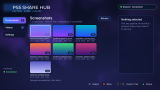
Screenshots and Videos tabs show your captures newest first in a thumbnail grid. Pick a clip and its page shows the thumbnail large with its real length and resolution, so you know it's the right one. Press Share and the original file goes to your Discord channel over TLS, with the progress on the button.
Make a webhook in Discord (Channel Settings, Integrations, Webhooks, New Webhook, Copy Webhook URL) and type it into Settings with the on-screen keyboard. It's kept on the console only, and Test webhook posts a test message.
Videos don't play in the app. The title has no video decoder, so clips show as a thumbnail with their length and resolution.
Send ps5-share-installer.elf like any payload and it writes the app to /data/homebrew/PPSA99992, or copy the PPSA99992 folder from the zip there yourself. Your saved webhook is kept either way. The app goes in the Media section of the home screen.
Release notes
v1.0 · PS5 Share Hub v1.0 · Oct 16, 2026
Capture gallery for PS5 that uploads screenshots and videos to Discord.
Install: extract the ZIP and copy the PPSA99992 folder to /data/homebrew on the console, then launch PS5 Share from the Media section. Open Settings in the app and add your Discord webhook URL (Channel Settings > Integrations > Webhooks in Discord); use Test webhook to confirm.
First release: gallery with thumbnails, video length/resolution info, TLS Discord uploads, on-console webhook entry, custom home-screen art.
Renderer base: ps5-homebrew-ui by BlackBearReloaded (GPL-3.0-or-later). Network stack: curl (MIT), mbedTLS (Apache-2.0).