

PS5 Monitor v1.4.8 by Sparrow
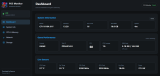
Payload with a web dashboard of the PS5's temperatures, clocks, fan, power draw, CPU and RAM use, the running game's FPS, network details and storage
Install on your PS5
Payload: start elfldr 0.25 or newer on the PS5 first. It listens on port 9021. Then press Send to PS5 beside the file under Files, on a computer or phone on the same network. elfldr downloads the payload and runs it, so the PS5 needs to be online.
Files
| File | Size | SHA-256 | |
|---|---|---|---|
| ps5-monitor-v1.4.8.elf | 1.7 MB | e5e5ed77…20b5 | Send to PS5 Download |
Screenshots
About PS5 Monitor
Send ps5-monitor-v1.4.8.elf to your ELF loader and open http://<PS5 IP>:9843/ in a browser on the same network. The page is served by the payload itself, so there's nothing to install on the phone or PC.
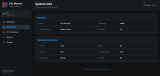
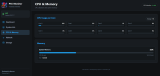
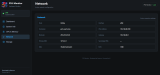
It shows the model, firmware, core count and uptime, the CPU and SoC temperatures, CPU and GPU clocks, fan duty, SoC power draw, CPU use per core and on average, and RAM in use and free. For the running game it shows the title ID and FPS. Network details cover the IPv4 address, netmask, gateway, DNS, MAC address and MTU, and storage covers internal storage, the M.2 SSD and USB extended storage.
It needs kstuff and an ELF loader. Some of the hardware readings come from the PS5-Suite project.
Release notes
v1.4.8 · PS5 Monitor v1.4.8 · Oct 10, 2026
- Fixed Memory usage issue