

PS5 Medic v0.4.5 by strongt1me
Check-up for a jailbroken PS5's homebrew setup: over 100 rules on HEN, kstuff, ShadowMount+, payloads and games, explained plainly, with fixes you can undo
Install on your PS5
App folder (.zip): unzip PS5-Medic-UI.zip and copy the FAKE42007 folder to /data/homebrew/ on the PS5, over FTP or from a USB drive. Some apps also need their title ID added to etaHEN's app list: the release notes say.
Payload: start elfldr 0.25 or newer on the PS5 first. It listens on port 9021. Then press Send to PS5 beside the file under Files, on a computer or phone on the same network. elfldr downloads the payload and runs it, so the PS5 needs to be online.
Files
| File | Size | SHA-256 | |
|---|---|---|---|
| PS5-Medic-UI.zip | 6.1 MB | 71761a4f…0ccd | Download |
| ps5medic-launcher.elf | 11.7 MB | fc4ff06e…e9cb | Send to PS5 Download |
Screenshots


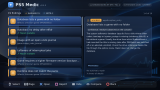
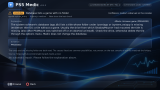
About PS5 Medic
Press Start check-up and it reads the live state of the homebrew setup: firmware, the jailbreak chain and HEN, kstuff, ShadowMount+ and its plugins, payloads and autoload lists, storage, game folders and images, databases, and the start-up and error history. Over 100 rules turn that into findings, each with a severity, a plain explanation, the file, line or value behind it and how sure the rule is. What it couldn't read is listed as such, never as OK.
The Games view gathers what's known about one title that won't start: its folder or image, its database entry, the firmware it needs, console errors, save data and the ShadowMount+ log. Fourteen fixes cover things like a wrongly named image, duplicate or missing autoload entries, BackPork in autoload and leftovers of broken transfers. Each shows what will change and what gets backed up before you press Cross. Nothing is deleted, only moved or renamed, and every change goes in a journal and can be undone. There are also eleven self-tests, a reference for 150 error codes such as CE-108262-9, a history of check-ups to compare, and a report with a QR code for your phone, with IP, MAC, account IDs and serial numbers taken out.
It needs an ELF loader on port 9021 and ShadowMount+ running, which makes the tile and gives the app access to /data. Copy the PS5MEDIC and FAKE42007 folders from the zip to /data/homebrew/, or send ps5medic-launcher.elf to the ELF loader and it writes both folders itself. The PS5 Medic tile appears under Media. When it opens, the app sends its service to the ELF loader, and Circle on the start screen closes both. Backups and the journal are kept in /data/ps5medic/.
- Up and Down: select, Cross: open, Circle: back or quit
- Triangle: repair or guide, Square: report
- L1 and R1: page through the findings, Options: hide a finding
It only goes online for rule updates when you ask, and takes only ones with a valid signature. It's in English, German, French, Italian and Spanish. The developer lists firmware 1.00 to 14.22, as far as the jailbreak works there, and has run it on 12.00 with ShadowMount+ 1.7beta12. Each rule is marked as confirmed or not yet confirmed.
Release notes
v0.4.5 · PS5 Medic 0.4.5 · Nov 20, 2026
English
PS5 Medic 0.4.5 – small follow-up to 0.4.4: the Payload Manager catalog now has English descriptions, and the French, Italian and Spanish READMEs link to the English documentation (docs/en/). The app itself is unchanged apart from the version number.
Deutsch
PS5 Medic 0.4.5 – kleine Nachbesserung zu 0.4.4: Der Payload-Manager-Katalog hat jetzt englische Beschreibungen, und die französische, italienische und spanische README verlinken auf die englische Dokumentation (docs/en/). Die App selbst ist bis auf die Versionsnummer unverändert.
Install: unzip PS5-Medic-UI.zip and copy the folders PS5MEDIC and FAKE42007 to /data/homebrew/ over FTP, or send ps5medic-launcher.elf to the ELF loader (port 9021) (it writes both folders itself, starts nothing and deletes nothing). ShadowMount+ must be running, it creates the tile. Details: [README](README.md), German: [README.de.md](README.de.md). Checksums: SHA256SUMS.txt in the zip. Licence GPL-3.0-or-later; when passing it on, offer the source code.
PS5 Medic is a community project and not affiliated with Sony; use at your own risk.
SHA-256 PS5-Medic-UI.zip: 71761a4f5282408e06d8626e21bd84fb60777570cc0eb7f83b12cf1d186b0ccd
SHA-256 ps5medic-launcher.elf: fc4ff06e658d8c8c0a2f77290b4bff35eed6a38210cd082b5dcaf4c5b446e9cb