

PS5-HLTB v1.2.0 by natkokrasevac
Play time for your PS5 and PS4 games on a web page, with charts and editing, and your times synced to your own HowLongToBeat account
Install on your PS5
Payload: start elfldr 0.25 or newer on the PS5 first. It listens on port 9021. Then press Send to PS5 beside the file under Files, on a computer or phone on the same network. elfldr downloads the payload and runs it, so the PS5 needs to be online.
Files
| File | Size | SHA-256 | |
|---|---|---|---|
| PS5-HLTB.elf | 1.3 MB | 612e6a6e…0863 | Send to PS5 Download |
Screenshots

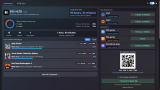

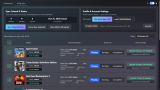
About PS5-HLTB
A fork of ghost1372's PlayTime. Send PS5-HLTB.elf to the ELF loader, and the console's browser opens http://127.0.0.1:7788. From a phone or laptop on the same network, scan the page's Phone QR code or open port 7788 at the console's address.
It lists your installed PS5 and PS4 games with play time per user, games played and not played, the average per game, and charts by user and platform. Search by name or title ID, filter by platform, and switch between dark and light themes. Play time can be edited per user, and the database is backed up first to /data/playtime_app.db.bak. Homebrew is listed on its own.
Sign in to HowLongToBeat, separately for each console user, and it matches your games with HLTB's Main Story, Main + Sides and Completionist times, keeps backlog, playing and completed lists, and sends your play time to your HLTB account in the background. Homebrew isn't synced. A notification on the TV says when the HLTB session has run out and you need to sign in again.
A button on the page adds a tile, HLTB00001, to the home screen's Media tab that opens the dashboard in the browser, and removes it again. Sending the ELF again while it runs opens the browser instead of starting a second copy. The developer says it works on every firmware your loader supports.
Release notes
v1.2.0 · PS5-HLTB v1.2.0 · Nov 2, 2026
What's Changed in v1.2.0
- PS5 Home Screen Media Tab Shortcut:
- Added a button in the Web UI dashboard to install a direct shortcut into the PS5 home screen's Media tab (
HLTB00001). - Uses native PS5 ShellCore
deeplinkUrito launch the PS5 browser directly tohttp://127.0.0.1:7788/without needing Payload Manager. - Full lifecycle support: one-click installation, live status detection, and clean uninstallation.
- Native on-screen PS5 TV toast notifications on install and removal.
- Duplicate Process Prevention:
- Automatically detects if PS5-HLTB is already active via loopback port probe and PID tracking (
/data/ps5_hltb.pid). - When re-triggered from Payload Manager, displays an on-screen notice and opens the PS5 browser instead of spawning redundant background processes.
- Cross-User Shared Completion Times:
- HowLongToBeat completion times, categories, and review scores fetched for any game are now cached globally and shared across all console profiles.
- Session Expiration Alerts:
- Added native on-screen PS5 TV notifications when the HowLongToBeat session expires or re-authentication is needed.
- UI & Viewport Refinements:
- Responsive layout polish, refined search suggestion dropdowns, and enhanced scaling across both mobile browsers and the PS5 internal browser.
Assets:
PS5-HLTB-v1.2.0.elf: Versioned payload ELFPS5-HLTB.elf: Standard payload ELF for direct loader deployment