

PS5 Custom Notifications v2.00 by DavidAlex95
Payload that shows the lines of a message.txt as PS5 system notifications, say a greeting at the end of your autoload, with a browser page to write the file
Install on your PS5
Payload: start elfldr 0.25 or newer on the PS5 first. It listens on port 9021. Then press Send to PS5 beside the payload you want under Files, on a computer or phone on the same network. elfldr downloads the payload and runs it, so the PS5 needs to be online.
Files
| File | Size | SHA-256 | |
|---|---|---|---|
| ps5_notify.elf | 120 KB | 7b898f97…e5b5 | Send to PS5 Download |
| message_maker.elf | 136 KB | 85d73028…2508 | Send to PS5 Download |
Screenshots

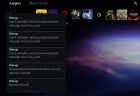

About PS5 Custom Notifications
Write a message.txt that starts with LINES, CHARS and DELAY, a line of three dashes, then your lines. Put it in /data/ps5_autoloader/ or in a ps5_autoloader folder at the root of an exFAT or FAT32 USB drive: the payload looks on usb0 to usb7 first, then internal storage. Send ps5_notify.elf to your loader, or put it at the end of your autoload.txt, and each non-empty line comes up as its own notification, with the delay you set between them.
Lines over 90 characters are cut short with three dots. A line of spaces counts as a line and shows an empty notification. If there's no message.txt, the error comes up in the console's language, any of 31.
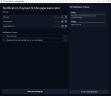
message_maker.elf serves a page on port 8080 for the PS5's browser or a phone or PC, where you set the options, write the lines and preview the notifications, and it saves message.txt for you. PS5 NotifyStudio.exe does the same on Windows and is on the developer's release page.
Release notes
v2.00 · V2.00 ps5 custom notifications · Oct 11, 2026
What's New in V2.00
- message.txt : Now I've changed its structure to allow configurations of different types of line numbers, characters per line, and delay; the configuration is changed in this file.
LINES=2
CHARS=80
DELAY=500
---
Welcome David!
All payloads have been executed, you can now start playing!
- ps5_notify.elf: Now you no longer need an .elf file for each delay. Now it reads the number of lines, characters per line, and delay between notifications from the message.txt file. Once you have created your message.txt, you only need this file to display the notification on screen.
- message_maker.elf: Open the PS5's web browser to create a message.txt file. There you can configure options such as the number of lines, characters per line, and the delay between notifications. You can also preview the notifications. You can also view this aplicattion on your PC (or mobile phone) connected to the same network at http://your-ps5-ip:8080/
- PS5 NotifyStudio.exe : Windows application with an interface to create the message.txt file where you can configure all the options such as number of lines, characters per line and delay between notifications, and you can also see a preview of the notifications. Finally, it generates the message.txt file in the same path as the application.