

Prism v1.0.1 by HaydenGriffin
Makes the DualSense the remote for a rooted LG TV through Home Assistant and Glasshouse, with a launcher for LG apps and quick TV settings
Install on your PS5
App folder (.zip): unzip PPSA99483.zip and copy the PPSA99483 folder to /data/homebrew/ on the PS5, over FTP or from a USB drive. Some apps also need their title ID added to etaHEN's app list: the release notes say.
Files
| File | Size | SHA-256 | |
|---|---|---|---|
| PPSA99483.zip | 6.3 MB | a05e7111…3363 | Download |
Screenshots
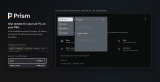
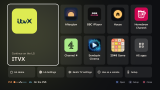
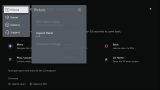
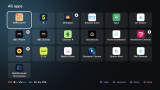
About Prism
Open an LG app from Prism and leave Prism running: the D-pad, Cross, Circle, play and pause, rewind and fast-forward go to the TV through Home Assistant. Hold Circle for 0.8 seconds to switch the TV back to the PS5. Presses only go out while the TV shows an LG app, an LG menu or the LG keyboard. Prism can't read another PS5 title's controller input, so keep it open while you use the LG.
The launcher is one screen: the last LG app as a Continue tile, favourites and recent apps with their own icons, All apps, LG Home, LG Settings and Quick TV settings for input, picture mode, OLED brightness, energy saving, sound mode, sleep timer and logo dimming. While the LG's keyboard is up, the touchpad opens the PS5 keyboard. Six themes.
It needs an LG TV on webOS, rooted, with Glasshouse and its Home Assistant MQTT bridge, and Home Assistant on your network at a numeric IPv4 address over plain HTTP. HTTPS, IPv6 and names such as homeassistant.local don't work. Copy the PPSA99483 folder to /data/homebrew/ and start Prism once your enabler has registered it. In Setup (Options), enter the address and a long-lived access token, pick the TV and mark the PS5's input.
The token is kept in plain text in Prism's own storage and goes unencrypted over Home Assistant's local HTTP, so use a trusted network. The developer has run it on one PS5 on firmware 7.20 with a 2021 LG C1, and says holding Circle to return, touchpad typing and rest mode aren't confirmed yet.
Release notes
v1.0.1 · Prism for PS5 1.0.1 · Oct 27, 2026
- The remote screen names Game Optimizer, and any other LG system screen without a name of its own is "LG screen", instead of showing its app ID.
- The README now shows Prism on the TV: screenshots the TV took of itself while LG Settings and Game Optimizer were open over Prism.
Install or update: close Prism, extract PPSA99483.zip and copy the PPSA99483 folder over the old one in /data/homebrew/. Your settings are kept. Check the ZIP against SHA256SUMS.