

PayLoader v00.001.003 by Marice
Controller front end for Payload Manager (pldmgr) on the TV: start, install and update payloads, and edit what starts with the console
Install on your PS5
App folder (.zip): unzip PPSA67670.zip and copy the PPSA67670 folder to /data/homebrew/ on the PS5, over FTP or from a USB drive. Some apps also need their title ID added to etaHEN's app list: the release notes say.
Files
| File | Size | SHA-256 | |
|---|---|---|---|
| PPSA67670.zip | 18.6 MB | 5647525a…2357 | Download |
Screenshots
About PayLoader
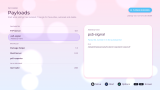
PayLoader shows itsPLK's Payload Manager (pldmgr) as a console app, so you don't need a browser. pldmgr does the work and keeps the settings. When it isn't running, PayLoader starts the copy it carries through the ELF loader on port 9021, and pldmgr then keeps itself up to date. L1 and R1 move between the screens, and the touchpad explains the one you're on.
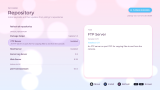
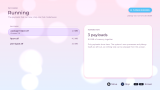
Payloads starts installed payloads and keeps favourites. Repository installs and updates payloads from pldmgr's repositories, and Running lists what runs now with its memory and stops one after asking. Settings adds and removes repositories and sets pldmgr's options.
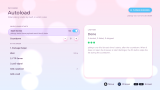
Autoload edits the boot chain your console uses: ps5-autoloader's autoload.txt (on USB first, then /data), or pldmgr's own list when there isn't one. Before the first change of a day it keeps a backup next to the list. Make a recovery USB copies the list and its payloads to a stick, switched off, so the chain can be moved to the stick if the console's list stops working.
Copy the PPSA67670 folder to /data/homebrew/. It needs etaHEN's Allow /data in sandbox to read /data. The developer lists a PS5 Pro on firmware 13.60 with Y2JB and ps5-autoloader.
Release notes
v00.001.003 · Nov 10, 2026
Fixed
- Repositories load on consoles where PayLoader made pldmgr's folder before pldmgr did. That folder was readable but not writable for pldmgr, so pldmgr could not save its repositories or sources: PayLoader showed no payloads to install or update. PayLoader now opens the folder for pldmgr, also on consoles where it is already there.