

Payload LauncherX payload-launcher-v0.2.6 by Yahballon
Native app that lists the payloads on a USB drive with their names, icons and details, sends the one you pick to the ELF loader, and can stop running payloads
Install on your PS5
App folder (.zip): unzip PPSA99873.zip and copy the PPSA99873 folder to /data/homebrew/ on the PS5, over FTP or from a USB drive. Some apps also need their title ID added to etaHEN's app list: the release notes say.
Files
| File | Size | SHA-256 | |
|---|---|---|---|
| PPSA99873.zip | 6.2 MB | 845997d6…3919 | Download |
Screenshots

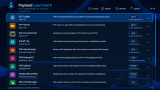
About Payload LauncherX
Give each payload its own folder in /mnt/usb0/payloads/, with an optional payload.json for its name, description, version, author and file name, and a payload.png for its icon. LauncherX lists them, and Cross sends the one you pick to the ELF loader on port 9021. It takes .elf, .efl and .bin files that hold a 64-bit ELF. When the app can't read the drive itself, it sends the included read-only usbscan.elf to the loader to list the folder and pass the payload over.
R2 opens Running Payloads, the payload processes that Payload Manager reports on port 8084, with their process ID and memory use. Press Cross twice on one to stop it. The ELF loader and Payload Manager are protected. This view only works while Payload Manager runs.
Copy the PPSA99873 folder from the zip to /data/homebrew/ and register it with ShadowMountPlus or another loader. Nothing launches unless the ELF loader is running. After a launch the status bar shows the loader's reply. Settings, automatic refresh and sorting, are kept in /data/ps5-payload-launcher/settings.txt.
- Up and Down: move through the list, L1 and R1: a page at a time
- Cross: launch, Square: details, Triangle: read the drive again
- R2: Running Payloads, L2: back to the USB list
- Options: settings, Circle: close or quit
Release notes
payload-launcher-v0.2.6 · Payload LauncherX v0.2.6 · Oct 13, 2026
Payload LauncherX v0.2.6 by YAHBALLON
Native PS5 USB payload browser with a blue neon console interface.
Features
- Discover
/mnt/usb0/payloads/<folder>/dynamically. - Display each payload's
payload.jsonname, description, version, and author. - Load each payload's local
payload.pngicon (with a fallback icon). - Launch an ELF payload by submitting its local file path to an already running elfldr daemon on
127.0.0.1:9021. - Monitor real running ELF daemons using the optional localhost ps5-payload-manager API (port 8084).
- R2 opens Running Payloads; L2 returns to USB. Refresh with Triangle.
- Kill selected non-critical ELF daemon only after explicit confirmation; elfldr and pldmgr are protected.
- Scroll through large lists and navigate with DualSense controls.
- Independent persistent settings for USB refresh and alphabetic sorting.
Installation
Extract PPSA99873.zip into /data/homebrew/, then register or refresh in ShadowMountPlus (or another compatible loader). An appropriate jailbreak/runtime and a compatible localhost ELF loader are required for payload launching. Firmware/hardware execution has not been independently verified.
Known limitations
The app submits the launch request; whether the payload ran successfully requires separate verification. USB paths depend on the console runtime, and unsupported or invalid PNG files use a fallback icon. Run only payloads you trust.