
ORION Media Center v01.107.000 by XeN-Made
Launcher that puts PS5 and PS4 games, homebrew, media apps and emulated games in one library, with box art and tabs of your own
Install on your PS5
App folder (.zip): unzip PPSA99062.zip and copy the PPSA99062 folder to /data/homebrew/ on the PS5, over FTP or from a USB drive. Some apps also need their title ID added to etaHEN's app list: the release notes say.
Files
| File | Size | SHA-256 | |
|---|---|---|---|
| PPSA99062.zip | 40.5 MB | e38f7280…1246 | Download |
Screenshots
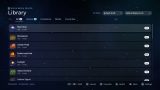
About ORION Media Center
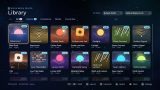
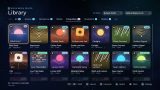
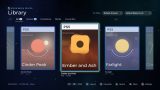
Everything ShadowMountPlus mounts and everything else on the home screen goes into one library: PS5 and PS4 games, homebrew, media apps and the games your emulators can see. It knows RetroArch, Porpoise, PS5SX2, PSwanStation, ProsperoEden, PS5-ECAM and PS5X360, and starts an emulated game straight in its emulator, asking once when two could play it. Put .elf payloads in /data/orion/payloads and they show on the Homebrew tab, where Cross sends them to the ELF loader.
Covers download as you scroll, from libretro's thumbnails, GameTDB, what the emulators already fetched, or SteamGridDB with a key of your own. Each tab has its own view (Grid, Cases or List) and sort order. Make your own tabs and sub-tabs, labels, themes and a background picture or moving GIF, and add .ogg files for background music. On system software 10 and later the play time is the console's own count.
Games on your own RomM server, or on a Windows or NAS share, show on their systems' tabs and download the first time you play them. ORION looks for updates on GitHub and installs them when you say so, keeping the replaced files in /data/orion/update/previous.
- Cross starts a title, Square makes it a favourite
- Triangle searches, Options opens the title's menu
- L1 and R1 change tab, R3 opens Settings
- Hold Circle to close ORION
It needs ShadowMountPlus, an ELF loader on port 9021 and an FTP server to copy it over. Upload the PPSA99062 folder to /data/homebrew/ with a plain FTP client in binary mode. To open ORION after every jailbreak, turn on Autoboot in Settings, System, and add orion-autostart.elf from its assets/payloads folder last in your autoload list.
Release notes
v01.107.000 · ORION Media Center 01.107.000 · Nov 2, 2026
Network drives on ORION: games on a Windows shared folder or a NAS on their systems' tabs, PS5 games and packages installed straight from the drive, and the console's own drives opened from a PC. Plus your own background picture, sub-tabs, moving several games at once, sizes, German, and fixes for the issues you reported.
Already on ORION: it finds this update by itself (or Settings, About, Check now); your settings, favourites and box art stay. A page of what changed shows once after the update. New install: download PPSA99062.zip, extract it and upload the PPSA99062 folder whole to /data/homebrew/ with a plain FTP client (binary mode). The README has every step.
New
Network drives
- Games on a network drive: Settings, Network drives. Games on a Windows shared folder or a NAS (SMB) show on their systems' tabs and copy to the console the first time you play them. Add a drive by name or address, from the console or from a phone with the QR code; Find drives searches the network.
- Install PS5 games from a network drive: a game's folder, a
.ffpkgor.exfatimage, or a ZIP, 7z or RAR archive (in parts too), unpacked as it comes off the network, to the drive you choose. - PS4 and PS5 packages: a drive's Install from this drive lists
.pkggames, add-ons and updates, shows which are installed, and hands them to the console's installer; Install all not installed queues them one after another. Activity (L3) shows the queue. - This console on a PC: Settings, Network drives, Share this console's drives. On a PC,
\\<console>in File Explorer opens its storage and USB drives, to copy games and files both ways.
Library
- Sub-tabs: Settings, Tabs, a tab, Inside, or New tab inside this one: a tab under another, with All first. L2 and R2 step through them.
- Several at once: Options, Select several: tick titles with Cross, then Options moves them all to a tab.
- Your own order: Options, Move within this tab: the direction buttons carry a title; the tab keeps your Custom order.
- Sizes: the console's free space at the top of the Library, each title's size under the covers, and sorting by Largest or Smallest first.
- Delete installed apps: Options, Remove: installed games and apps go through the console's own uninstall, and ELF programs can be deleted.
- Labels: ORION's GAME, PS4, HOMEBREW and MEDIA labels on any title, and labelling a title GAME makes it a game (its shelf, its Details). Settings, Tabs, a tab, Default label gives its titles one.
- Emulators: Porpoise lists Wii
.wadgames, PS5X360 lists Games on Demand and Arcade games, and ProsperoEden Switch UI is known as well as ProsperoEden.
Look and setup
- Your own background: Settings, Appearance: a picture of your own behind the library, a moving GIF or WebP too, with snow, rain or fireflies over it.
- A fuller setup: ready-made labels and your own, every tab shown or hidden, and each game's tab and label. Settings, System, Run setup again opens it any time.
- Deutsch: ORION in German.
Fixed
- Moving a tab in Settings steps past hidden tabs, so it moves on the tab bar at once (#19).
- ORION opens again after a short rest too, not only after a long one.
- Games installed on extended storage are found, and ORION's helper tries again when the ELF loader is not ready yet.
- PS5 packages that keep their name further in (most add-ons) are recognised.
- A RetroArch folder named the short way (
content/gba) no longer makes a second tab for its system. - Circle in the background picture browser goes back a folder, then to Appearance.
- Network drives: Windows 11 PCs are found by name, and a PC's shared folders are listed.
- An ELF program that no ELF loader takes says so, and the attempt is in the logs (#15).
- Emulators installed as packages, or with a renamed tile, are found.
Links
- Site: https://xen-made.github.io/Orion-Media-Center/
- Questions and bug reports: ORION Discord, #bug-reports