

OpenRCT2 v1.0.0 by lowbit
Build theme parks on the PS5 with the DualSense alone, using the files from your own RollerCoaster Tycoon 2
Install on your PS5
App folder (.zip): unzip PPSA99728.zip and copy the PPSA99728 folder to /data/homebrew/ on the PS5, over FTP or from a USB drive. Some apps also need their title ID added to etaHEN's app list: the release notes say.
Files
| File | Size | SHA-256 | |
|---|---|---|---|
| PPSA99728.zip | 74.4 MB | f5c3d0a2…667e | Download |
Screenshots

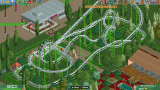
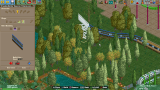
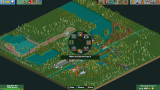
About OpenRCT2
Bring your own RCT2: the GOG Triple Thrill Pack offline installer, or the game folder from an installed GOG or Steam copy. On the console it needs kstuff and ShadowMountPlus.
On the first start it shows an address and a QR code. Open that in a browser on a PC or phone on the same network and send the GOG setup .exe with its .bin, the game folder (the one with Data, ObjData, Scenarios, Tracks and Landscapes), or a ZIP of that folder from a phone. The game starts by itself once everything has arrived.
Everything is laid out for the pad. The left stick or touchpad moves a pointer, the D-pad jumps between buttons and through lists, and Options and Triangle open radial menus for the build tools and the park windows. Track is laid with the D-pad, and the bottom of the screen shows what each button does at that moment. Multiplayer and the other online parts are left out.
Release notes
v1.0.0 · OpenRCT2 for PS5 v1.0.0 · Oct 6, 2026
OpenRCT2 0.5.5, the open-source re-implementation of RollerCoaster Tycoon 2, as a native PS5 title played with the DualSense alone. Bring your own copy of the game: send the GOG installer or the game folder from a PC or phone browser.
<p align="center">
<img src="https://github.com/lowbit/ps5-openrct2/raw/v1.0.0/screenshots/coaster.png" width="49%" alt="A looping coaster through the trees, its station queue full of guests">
<img src="https://github.com/lowbit/ps5-openrct2/raw/v1.0.0/screenshots/track-building.png" width="49%" alt="Building a wooden roller coaster, the controller's buttons shown at the bottom">
</p>
What's in it
- A native title. Its own icon on the home screen, 1080p at 60 frames per second, the game's music and sounds, and saves and settings kept on the console.
- Made for the controller. The left stick or the touchpad moves a pointer that slows down over buttons, the d-pad jumps between buttons and steps through lists, sliders and dropdowns, L1 and R1 switch tabs, and the bottom of the screen shows what each button does right now.
- Radial menus. Options opens the build tools and Triangle the park windows in a ring in the middle of the screen: hold, point with the stick, let go.
- Building on the controller. Track and bridge paths go down piece by piece with the d-pad and Cross, with banking on L1 and R1 and the chain lift on Triangle. Scenery is raised and lowered with the d-pad.
- Your game files from a browser. On the first start the console shows an address and a QR code. Send the GOG installer (its .exe and .bin together; the console unpacks it in about a minute and a half), the game folder, or a ZIP file of it.
<p align="center">
<img src="https://github.com/lowbit/ps5-openrct2/raw/v1.0.0/screenshots/import-screen.png" width="49%" alt="The import screen on the TV, receiving the GOG installer">
<img src="https://github.com/lowbit/ps5-openrct2/raw/v1.0.0/screenshots/upload-page.png" width="49%" alt="The same transfer on the page in a PC browser">
</p>
Install
- Download
PPSA99728.zipand check it againstPPSA99728.zip.sha256. - Extract it and copy the
PPSA99728folder to/data/homebrew/(FTP, ps5upload or USB). - ShadowMountPlus registers it within a few seconds and OpenRCT2 appears on the home screen. Start it and send your game files.
Needs a jailbroken PS5 with kstuff and ShadowMountPlus, and your own RollerCoaster Tycoon 2 (the Triple Thrill Pack from GOG or Steam). Tested on firmware 13.00.
The package contains no RollerCoaster Tycoon 2 data. See the README for controls and licenses/ in the package for the third-party notices.
SHA-256 of PPSA99728.zip: f5c3d0a2168b5527a08ab2f335ab89057ab93082cde08813b6567b156fb1667e