

OpenPSApp v0.3.3 by marcelorsdd
Playtime per game, every trophy including hidden ones, a monthly recap and a trophy timeline, read from the console's own files
Install on your PS5
Payload: start elfldr 0.25 or newer on the PS5 first. It listens on port 9021. Then press Send to PS5 beside the file under Files, on a computer or phone on the same network. elfldr downloads the payload and runs it, so the PS5 needs to be online.
Files
| File | Size | SHA-256 | |
|---|---|---|---|
| openpsapp.elf | 5.9 MB | 85d05abe…57bf | Send to PS5 Download |
Screenshots

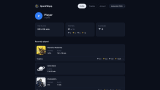
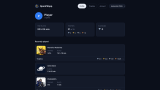
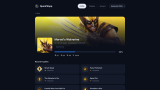
About OpenPSApp
PlayStation App style profile pages, offline. It reads the console's playtime database and local trophy files without writing to them, and serves its pages on port 7777. On first run it adds an OpenPSApp tile to the Media tab, and phones or computers on your network can open http://<PS5 IP>:7777.
Each game shows playtime, when you last played, key art, trophy progress and its latest trophies. Hidden trophies stay hidden until you reveal them. The profile adds a platinum count, a month-by-month trophy recap, milestones and a timeline grouped by day. Titles you don't want counted, homebrew for example, can be hidden from the lists and totals.
Load openpsapp.elf with your payload loader (elfldr on port 9021, Prospero Manager or autoload). The tile only opens the pages while the payload is running. Settings are in /data/openpsapp/config.json. In Portuguese, English and Spanish, following the console language.
Release notes
v0.3.3 · Nov 20, 2026
Fixed
- The Profile no longer fails with HTTP 500 on firmware whose playtime database has no
playedTimeOnConsolecolumn, such as 6.02 (#18). There OpenPSApp shows the total that PSN keeps for each game,gltTotalPlayedTime. A missing column in the playtime database no longer causes an error: OpenPSApp uses the next column it knows, or shows no playtime.