

OmniPad CE v1.7.1 by jpemendonca
Third-party controllers as DualSense players 2 to 4 on the PS5, over USB, 2.4 GHz dongles or Bluetooth through a USB adapter
Install on your PS5
Payload: start elfldr 0.25 or newer on the PS5 first. It listens on port 9021. Then press Send to PS5 beside the file under Files, on a computer or phone on the same network. elfldr downloads the payload and runs it, so the PS5 needs to be online.
Files
| File | Size | SHA-256 | |
|---|---|---|---|
| OmniPad-CE.elf | 537 KB | 4d0ffe36…1638 | Send to PS5 Download |
Screenshots
About OmniPad CE
A continuation of diegobarbosaa's OmniPad. Each controller shows up on the console as a DualSense for players 2 to 4, and the official DualSense stays player 1 on the console's own radio. Start OmniPad-CE.elf with your payload loader. Sending it isn't enough, so press Launch in Prospero Manager or PLK Payload Manager and wait for the notification. Then plug in a pad or its dongle, or put a Bluetooth pad in pairing mode. Press PS on it and pick a profile.
Bluetooth goes through a second, ordinary USB adapter, so the DualSense keeps the console's radio. The developer lists the TP-Link UB500 (Realtek RTL8761BU), whose firmware OmniPad loads by itself, and generic CSR 4.0 sticks, where searching for a second pad while one plays can lock the chip up. Other Realtek chips don't work yet. If you also run BlueBird, each one needs its own adapter.
The developer lists the DualShock 4 on Bluetooth or a cable, the 8BitDo Ultimate 2C, Xbox Series pads on a cable or Bluetooth, two Joy-Cons joined as one controller, and a DualShock 4 through the 8BitDo USB Wireless Adapter 2, all on firmware 13.60. Xbox One, Xbox 360, DualShock 3, Switch Pro and generic pads are written from the spec. There are no adaptive triggers or haptics, the touchpad is one click, and Microsoft's Xbox Wireless Adapter isn't supported.
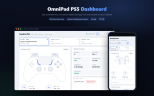
The dashboard is the OmniPad icon in the Media tab, or http://<PS5-IP>:8105 on a phone or PC. It has a live controller test, connection and battery info, Bluetooth pairing, the log, and button mapping per controller model, where two buttons together make a combo, so L3 + R3 can click the touchpad. It's in seven languages. Send a report uploads the log and diagnostics to the developer's server and gives you a code to quote. Nothing is sent unless you press it, and reports are deleted after 90 days.
Release notes
v1.7.1 · OmniPad CE 1.7.1: the Media tab icon explains how to start OmniPad, Xbox Series pairs on a UB500 · Nov 16, 2026
The Media tab icon now tells you how to start OmniPad, and two controllers confirmed by the community join the list.
First time? See the Quick start. After sending the file, press Launch.
New
- Media tab icon: opened while OmniPad is not running, it shows the two steps to start it and opens the dashboard by itself as soon as OmniPad answers. The console's browser keeps this page after you open the icon once with OmniPad running.
- Joy-Cons: when the pair connects, a notification reminds you to pick your profile and confirm with B (the bottom button), not A.
- Dashboard: Something wrong? Send a report now sits on the status bar, in blue, and Copy diagnostics at the top right.
- GuliKit TT Pro on its 2.4 GHz dongle joins the compatibility list.
Fixed
- Xbox Series over Bluetooth on a TP-Link UB500: it now pairs.
- Controllers and receivers in Switch Pro mode on USB (GuliKit TT Pro dongle, 8BitDo receivers in Switch mode): buttons read correctly and the connection stays up.
Tested on PS5 (FW 13.60)
- DualShock 4 over a USB Bluetooth adapter (TP-Link UB500).
- DualShock 4 through the 8BitDo USB Wireless Adapter 2.
- 8BitDo Ultimate 2C on its 2.4 GHz dongle.
- Two Joy-Cons joined as one controller, with the new notification and a profile picked.
- The dashboard with the buttons in their new places.
- The Media tab icon, with OmniPad running and stopped, including the update from 1.7.0.
Confirmed by the community
- Xbox Series paired over Bluetooth on a TP-Link UB500 (issue #10, thanks @SuperLeiyan).
- GuliKit TT Pro on its 2.4 GHz dongle (issue #3, thanks @Omnisthetics).
File
OmniPad-CE.elf: sha256 4d0ffe3646c297bd159781df31d6aed688c0eb50eb40aa5b2215969d35b61638
Licences
- OmniPad CE: GPL-3.0.
- Embedded Realtek RTL8761BU firmware: the licence notice is in
LICENCE.rtlwifi_firmware.txt, attached here, and indocs/THIRD_PARTY.md. - Media tab icon and dashboard favicon: Material Symbols (Google, Apache-2.0).