

Omega dashboard v2026.10.16.1 by TheCriicom
Replacement dashboard with your games and homebrew in one row, a homebrew store, music and friends
Install on your PS5
Payload: start an ELF loader on the PS5 first, such as elfldr, which listens on port 9021. Then open this address in a browser on a computer or phone on the same network, with your PS5's address in place of PS5. elfldr downloads the payload and runs it.
http://PS5:9021/?uri=https%3A%2F%2Fstore.brewology.com%2Fdl%2F3908%2Fomega-installer.elf
Files
| File | Size | SHA-256 | |
|---|---|---|---|
| omega-installer.elf | 211 KB | 34562f26…1f2c | Download |
Screenshots
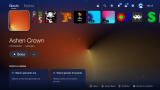
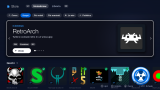
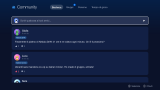
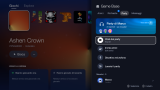
About Omega dashboard
Can stand in for your home screen if you want it to, and asks on the first launch. Installed games and homebrew sit in the same row and start from there. The Store only has open-source homebrew, with search, ratings and comments, and puts .pkg, .zip and .elf files in the right place.
Music keeps playing while you game: internet radio, Navidrome and other Subsonic servers, USB files or any audio link. A web page on port 9095 works as a phone remote once you scan the QR code and type the PIN. There are system tools for temperatures, fan threshold, storage and files as well.
The social side has friends, a wall, group chats, party chat with voice, game invites and playtime. That all goes through an Omega server. The official one is always there, and you can add another or host your own.
You need a HEN such as OnionHEN or etaHEN, or websrv with a payload loader. At start it sees which one you have and asks before setting up its own services. 27 languages.
Music keeps playing while you game: internet radio, Navidrome and other Subsonic servers, USB files or any audio link. A web page on port 9095 works as a phone remote once you scan the QR code and type the PIN. There are system tools for temperatures, fan threshold, storage and files as well.
The social side has friends, a wall, group chats, party chat with voice, game invites and playtime. That all goes through an Omega server. The official one is always there, and you can add another or host your own.
You need a HEN such as OnionHEN or etaHEN, or websrv with a payload loader. At start it sees which one you have and asks before setting up its own services. 27 languages.
Release notes
v2026.10.16.1 · Omega 2026.10.16.1 · Oct 16, 2026
- No piracy: Omega has no connection with Overdrive, its forks or any other game piracy store, and shares no code with them. It does not contain, list or download commercial games; the Store only offers open-source homebrew. This is now stated in the README (all 27 languages), on the website (new FAQ and footer) and in the app's "What's new" window.
- My library reads only Omega's format: an array or
{"items":[...]}withtitle,urland the optional fields documented indaemon/README.md. Third-party catalogue lists (FPKGi and similar,pkg_url/content_idlists) are no longer imported: the library is for your own personal backups. - The repository is now
TheCriicom/omega-dashboard(the old address redirects).
Install
Open https://play.omegasuite.it/installa in the console browser, or send omega-installer.elf to your payload loader. Existing installs update by themselves.
Omega is an independent project, not affiliated with Sony Interactive Entertainment. It contains no games and does not bypass any copy protection.