
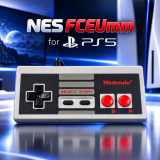
NES FCEUmm v1.2 by MisterTemaki
FCEUmm as a native PS5 app for NES, Famicom and Disk System games, with Mesen's header fixes and palettes, HD packs, CRT shaders and games from a network share
Install on your PS5
App folder (.zip): unzip NESFCEUmmPS5-v1.2-PPSA99013.zip and copy the PPSA99013 folder to /data/homebrew/ on the PS5, over FTP or from a USB drive. Some apps also need their title ID added to etaHEN's app list: the release notes say.
Payload: start elfldr 0.25 or newer on the PS5 first. It listens on port 9021. Then press Send to PS5 beside the file under Files, on a computer or phone on the same network. elfldr downloads the payload and runs it, so the PS5 needs to be online.
Files
| File | Size | SHA-256 | |
|---|---|---|---|
| NESFCEUmmPS5-v1.2-PPSA99013.zip | 27.3 MB | 9727145b…46e4 | Download |
| NESFCEUmmPS5-v1.2.elf | 21.2 MB | e7786fd8…4844 | Send to PS5 Download |
Screenshots
About NES FCEUmm
The libretro FCEUmm core, the NES emulator with the widest board support, in a home-screen app with a 3D game shelf. It adds Mesen's game database, which corrects bad iNES headers for 9,361 more games before they start, Mesen's and Nestopia's palettes (28 in all), Blargg's NTSC filter and Mesen-format HD packs. VS. System games work, with a coin button you set yourself.
No games or BIOS are included. Games (.nes, .unf, .unif, .fds, also inside a .zip or .7z) go in /data/fceumm/roms/NES or FDS, the same folders under fceumm/roms on a USB drive, or on an SMB or NFS share. Disk System games need your own disksys.rom in /data/fceumm/bios/. HD packs go in /data/fceumm/bios/HdPacks/, in a folder named like the ROM.
There are ten save state slots, rewind, fast forward, turbo buttons, up to four players, CRT shaders, menus in five languages and covers downloaded in the background. The author hasn't run it on a console yet and asks for reports with debug logs on (they go in /data/fceumm/logs/).
It needs kstuff (or kstuff-lite), an ELF loader on port 9021 and ShadowMountPlus. Send the ELF once: it installs the app in /data/homebrew/PPSA99013/ and stays running as its helper.
- L3 + R3: pause menu
- Touchpad click: Select
- L1: Disk System, next disk side
- R1: Disk System, eject or insert
- L2 + Up or Down: save or load a state
- Hold R2: fast forward
- Hold L2 + R2: rewind
Release notes
v1.2 · NES FCEUmm PS5 1.2 · Nov 20, 2026
NES FCEUmm PS5 1.2
Four players and updates from the app, as Genesis Plus GX PS5 has them. Thanks to BombaaMaan for asking (#2).
Four players
- Settings, CONTROLS, 4-player adapter: Auto (the default), Off (2 players), NES Four Score or Famicom 4-player adapter. Players 3 and 4 are the third and fourth signed-in users' controllers; the light bar shows the player.
- Auto gives a game the adapter it was made for. It knows 168 games by their ROM's CRC: FCEUmm's own 59 and 109 more from Mesen's game database (Nintendo World Cup (USA) (Rev 1), Monopoly, Danny Sullivan's Indy Heat, Nekketsu Koukou Dodgeball-bu (VC), homebrew such as Super Homebrew War...). It also follows an NES 2.0 header that names the Four Score or the Famicom adapter. Over a game, the row shows what Auto chose ("Auto (Four Score)").
- For a hack, a homebrew or a dump the lists don't know, choose the adapter yourself. The change applies at once, in the game too.
- Turbo A and Turbo B work for players 3 and 4 too.
- A game started with an adapter says so for a moment ("NES Four Score: players 3 and 4 can join").
- Games in FCEUmm's Famicom list had the Four Score switched on beside the Famicom adapter. Now only the adapter is in.
Updates from the app
- Settings, SYSTEM, Updates: Check now, Install 1.3 (... MB), then Installed: close and open again. Cross closes the app (a running game is closed and saved first); open it again from the home screen to run the new version. The app also checks once a day when it starts, and a notification says when a newer version is out. Nothing is installed until you choose Install.
- The helper downloads the app's zip from this repository's releases. Before writing anything, it checks the zip's size and SHA-256 against GitHub's and every file against the zip's manifest. It then installs with
eboot.binlast and keeps no copy of the old version. Games, saves and settings aren't touched. - It updates the copy the console runs, also when ShadowMount+ runs the app from a USB or extended drive. An app run from an image or a read-only folder can't be updated in place, and Settings says so.
- 1.1 has no updater, so install 1.2 with its ELF. Later versions can come through the app.
- 1.1's helper keeps running until the console restarts, and it can't update. Until you restart, Settings, Updates says Restart the PS5, and the 1.2 ELF's notification says so too.
- Your autoload: replace the 1.1 ELF with 1.2's. A 1.1 ELF in the autoload would install 1.1 again at every start of the console, over a newer app.
Fixes and safety
- C++ exceptions in the app: up to 1.1 the eboot mixed the system's C++ runtime with its own. Stella PS5 1.0 crashed at its first exception with that same mix. The eboot now carries its own whole runtime, and the build refuses an eboot that imports it. A failed allocation now raises
std::bad_allocinstead of stopping the app. With the debug logs on,boot.logsaysexceptions: okat start. - The helper's HTTPS (covers and updates): a malformed chunk size can no longer push a download past its limit, and a redirect from HTTPS down to plain HTTP isn't followed. Covers and updates can run side by side.
- A thread the system refuses (sound, notifications, covers, network shares) no longer ends the app, and SIGSYS is in the crash report.
- The ELF is smaller (22 MB instead of 30 MB): the two identical home-screen backgrounds are built in once.
Files
NESFCEUmmPS5-v1.2.elf: send it to the ELF loader (port 9021), or put it in your autoload.NESFCEUmmPS5-v1.2-PPSA99013.zip: the app folder that Settings, Updates downloads. You don't need it by hand.fceumm-ps5-v1.2-src.zip: the complete source (GPL-3.0-or-later).
Port by github.com/MisterTemaki, after the design of PS5SX2.