

Nativehbl v0.1 by Rufidj
Homebrew launcher on the TV that finds apps on internal, USB and extended storage and starts them, with themes and each app's music
Install on your PS5
Payload: start elfldr 0.25 or newer on the PS5 first. It listens on port 9021. Then press Send to PS5 beside the payload you want under Files, on a computer or phone on the same network. elfldr downloads the payload and runs it, so the PS5 needs to be online.
Payloads (.zip): nativehbl-0.1.zip holds ps5_homebrew_launcher_bootstrap.elf and ps5_homebrew_launcher_ui_swonly.elf. The payloads are under Files on their own too, so Send to PS5 can take them.
Files
| File | Size | SHA-256 | |
|---|---|---|---|
| nativehbl-0.1.zip | 4.6 MB | 859d8362…05d6 | Download |
| ps5_homebrew_launcher_bootstrap.elf | 201 KB | 9e7e699a…83c0 | Send to PS5 Download |
| ps5_homebrew_launcher_ui_swonly.elf | 9.4 MB | 335215e7…75f6 | Send to PS5 Download |
Screenshots
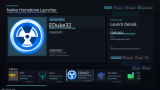
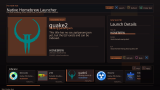
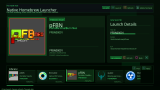
About Nativehbl
A launcher with its own screen in place of websrv's browser page, using launch code taken from John Törnblom's websrv. It looks in /data/homebrew and the homebrew folders on usb0, usb1, ext0 and ext1, lists what it finds, and plays an app's sndgame.ogg or snd0.ogg on a loop while it's selected.
Put ps5_homebrew_launcher_bootstrap.elf and ps5_homebrew_launcher_ui_swonly.elf in /data/, then load the bootstrap ELF with your ELF loader or autoloader, never the UI ELF. The author suggests about 5 seconds of delay in an autoloader. Like websrv, it needs the Homebrew Launcher package installed on the console.
- Left / Right: choose an app
- Cross: start it
- Square: scan again
- Triangle: next theme
- Circle: leave
Five themes are built in, and each can be changed with a manifest.json in /data/nativehbl/skins/<skin_id>/. The log is /data/ps5_homebrew_launcher.log.
Release notes
v0.1 · Jun 2, 2026
Firts release