

MicroPython v0.2.3 by Yahballon
MicroPython 1.26.1 on the PS5, with a code editor you work with the controller, scripts from internal storage or USB, and the output on screen
Install on your PS5
App folder (.zip): unzip PPSA99791.zip and copy the PPSA99791 folder to /data/homebrew/ on the PS5, over FTP or from a USB drive. Some apps also need their title ID added to etaHEN's app list: the release notes say.
Files
| File | Size | SHA-256 | |
|---|---|---|---|
| PPSA99791.zip | 5.9 MB | cb6466da…b8b3 | Download |
Screenshots
About MicroPython
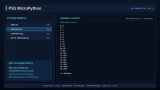
Write Python on the console with the DualSense and an on-screen keyboard, save it and run it. The output shows on screen. It's MicroPython, not desktop Python, so there's no pip, no live REPL and no native extensions, and a script can be up to 64 KiB. A script stuck in an endless loop holds up the app until you close it.
Your scripts are saved in /data/PS5MicroPython/scripts/. It also lists scripts in scripts/ or PS5MicroPython/scripts/ on a USB drive. Editing an example or a USB script saves a new copy in /data and leaves the original alone. hello.py, fibonacci.py and collections.py come with it.
Controls:
- In the list, Cross runs a script, Square edits it, Options starts a new one and Triangle rescans
- In the editor, Cross types, Square deletes, Triangle adds a line and Options saves
- L1 and R1 move the cursor, L3 and R3 move it a line up or down, L2 indents and R2 changes the keyboard page
Copy the PPSA99791 folder to /data/homebrew/. Keep /data/PS5MicroPython/ when you update. The developer lists firmware 5.10.
Release notes
v0.2.3 · PS5 MicroPython by YAHBALLON v0.2.3 · Oct 21, 2026
PS5 MicroPython v0.2.3 — Standalone release
Native MicroPython homebrew by YAHBALLON.
- Real MicroPython v1.26.1 interpreter with console output and demo programs.
- Built-in DualSense Python editor: create, edit, save and run scripts directly on PS5.
- Native DATA / USB0–USB7 script discovery and source loading.
- Native libkernel writing with safe temporary files and atomic rename.
- Up to 64 KiB Python files; persistent /data/PS5MicroPython/scripts folder.
- Bundled hello.py, fibonacci.py and collections.py.
Title ID: PPSA99791 — extract the installer ZIP into /data/homebrew/.
User confirmed the v0.2.3 runtime, editor and script loading on a jailbroken PS5. Embedded MicroPython is not full CPython; no pip, C extensions or live REPL.