

Mediathek v01.000.110 by M0S4YSH3LL0
Library for your own films and series on internal, USB and extended storage, with TMDB posters, shelves and its own player
Install on your PS5
App folder (.zip): unzip Mediathek-PPSA66120-01.000.110.zip and copy the PPSA66120 folder to /data/homebrew/ on the PS5, over FTP or from a USB drive. Some apps also need their title ID added to etaHEN's app list: the release notes say.
Files
| File | Size | SHA-256 | |
|---|---|---|---|
| Mediathek-PPSA66120-01.000.110.zip | 31.2 MB | 3816663d…1c32 | Download |
Screenshots

About Mediathek
Put films in a movies folder and series in a tvshows or series folder, on the internal drive, a USB stick or extended storage, and Mediathek finds them up to six levels down. It turns release-style file names into a title and year. Up to eight more folders can be added in Settings, Library, each set to hold films, series or both.
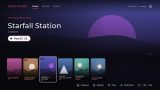
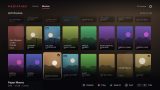
Home has a billboard and shelves for Continue Watching, Recently Added, collections, genres and decades. Movies and Series each get a grid with search and sorting, and the details page picks the season and episode. With a free TMDB key in /data/homebrew/PPSA66120/mediathek.env (a line TMDB_API_KEY=your-key) it fetches posters, wallpapers, descriptions and scores. Your own poster and fanart pictures beside a film always win.
H.264 and HEVC up to 3840 x 2176 play on the console's hardware decoder, and FFmpeg decodes the rest on the CPU. HDR goes to an HDR TV as HDR10 or is tone-mapped for an SDR screen, and 5.1 and 7.1 go to the 8-channel output. It shows the subtitles inside a film and .srt files beside it, and forced tracks on their own. AV1 doesn't play. In a series, R1 starts the next episode.
It needs an ELF loader on 127.0.0.1:9021, which etaHEN has. The app sends a small helper there to list your folders, and without it finds no films. Copy the PPSA66120 folder to /data/homebrew/. In English and German. The developer lists firmware 12.70.
Release notes
v01.000.110 · Mediathek 1.1.0 · Nov 20, 2026
Mediathek 1.1.0 (01.000.110)
A Netflix-style library and player for your movies and series on the PS5. Put your films in a movies folder and your series in tvshows on the internal drive, a USB stick or extended storage; Mediathek finds them, shows a billboard and shelves with their posters, fetches covers and descriptions from TMDB, and plays them. English and German.
What's new in 1.1.0
- AV1 films play, HDR10 and HLG included. They are decoded on the CPU by dav1d, as in VLC's PS5 port (the console's video decoder is not known to take AV1), and shown like every other film: tone-mapped on an SDR TV, sent as HDR10 to an HDR one. A 1080p HDR film plays and seeks smoothly; whether 4K keeps up on the console's CPU is not checked yet.
- A larger details page: a bigger cover and a taller column of text, so a film's description has room for about nine lines instead of five. On a series' page the episode's and the season's descriptions share the room better.
- The year from TMDB: a film or series whose file or folder name gives no year takes TMDB's (the release, or the first air date), and each season's heading shows the year it aired ("SEASON 2 · 2016"). A year in the name still wins.
- L1 in the player starts the film or episode again from the beginning (L2 still jumps back a minute). Pressed twice within a second in a series, it plays the episode before.
Features
- Home: a billboard for the focused title, tinted by its colours, and one shelf at a time: Continue Watching, Recently Added, collections, one per genre, decades, All Movies and All Series.
- Movies and Series: an eight-column grid, sortable by title, newest or year (R3), with search (Triangle). Series with seasons and episodes, and the next episode in the player.
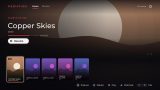
- Details: length, formats, score, genres and languages (sound and subtitles, also guessed from file names and subtitle text); L1/R1 step between titles.
- Player: scrubber, seeking (hold left/right to seek faster), pause, audio-track and subtitle switching (the film's own and
.srtfiles), a stream info panel. It remembers where you stopped; 92% counts as watched. H.264 and HEVC on the hardware decoder, AV1 through dav1d, HDR10 output on an HDR TV, tone mapping on an SDR one, surround sound. - Settings: Appearance, Playback, General, Library and About, saved as you change them.
- Automatic covers: with a free TMDB key, posters, wallpapers and descriptions are fetched for titles that lack them. Pictures you put beside a film always win.
Good to know
- Needs a PS5 that runs homebrew, with a loader that starts apps from
/data/homebrewand an ELF loader on127.0.0.1:9021. Without it the app starts but finds nothing. - Your settings, resume points and covers carry over. Films and series fetched before ask TMDB once more, for their year and each season's.
- Checked on the author's console, firmware 12.70: AV1 at 1080p with HDR (seeking included), the larger details page, the year from TMDB, L1 in the player, and everything from earlier releases. Not yet checked on a console: 4K AV1, 7.1 sound, a forced subtitle file (
Film.de.forced.srt), PGS and VobSub picture subtitles, 4K H.264, HLG and Dolby Vision films. - Films whose file has no seek index (an MKV without Cues) take longer the farther you jump; remuxing with
ffmpeg -i in.mkv -c copy out.mkvfixes that. - Styled ASS subtitles are shown as plain text.
- Install: download
Mediathek-PPSA66120-01.000.110.zipbelow (check it against the.sha256file), unpack it and copy thePPSA66120folder to/data/homebrew/on the console. To update, copy the new folder over the old one. The README's Install section has the details. To build it yourself, runmake(see the README; building now needsnasm).
Full details in the README and the CHANGELOG. Licensed GPL-3.0-or-later. The hardware decoder, HDR output and surround sound build on what EVO Player, ps5-hardware-video-decoding-research and VLC's PS5 port found out; AV1 is decoded by dav1d (BSD-2-Clause, see THIRD_PARTY_NOTICES.md).