

Lineup v2.0.1 by bps2414
Rearrange the games on the PS5 home screen with the controller, pin the ones that should keep their place, and hide tiles you don't use
Install on your PS5
App folder (.zip): unzip Lineup-2.0.1.zip and copy the PPSA99077 folder to /data/homebrew/ on the PS5, over FTP or from a USB drive. Some apps also need their title ID added to etaHEN's app list: the release notes say.
Files
| File | Size | SHA-256 | |
|---|---|---|---|
| Lineup-2.0.1.zip | 13.4 MB | f358e620…1115 | Download |
Screenshots
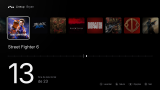
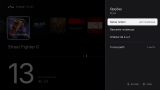
About Lineup
The PS5 orders the home row by when you last opened each game. Lineup shows that row on the TV, and you lift a game, carry it and drop it somewhere else. A pinned game holds its place when you open other games, and the rest still follow the system's rule. Every profile has its own row, and the Media tab works the same way with its own pins.
A divider marks where the home screen's edge of 12 games falls. The Options menu has sort A to Z, pin or unpin the whole row, moving homebrew and emulators between Games and Media, and hiding apps, the PS Store, All Apps and other system tiles on a profile. Hidden apps come back from Options, Hidden apps.
- Cross: lift the game, then drop it
- D-pad: move, or carry the lifted game
- Square: pin or unpin
- Triangle: save
- Circle: put the game back, or quit
- L1 and R1: Games or Media tab
- Options: the Options menu
It needs kstuff, an ELF loader on port 9021 and ShadowMountPlus. Lineup starts its own small service, lineupd, through the loader. Before each save it copies the home screen database to /data/lineup/backups/, and it runs SQLite's checks before and after writing. It looks for a new version when it opens and asks before updating. The developer lists firmware 13.60, with the database checks also passing on copies from 11.40 and 13.00.
Release notes
v2.0.1 · Lineup 2.0.1 · Nov 11, 2026
2.0.1
- Moving an app whose
AppInfoJsonis a field list, as older firmware and some package installers write it, now changes the tab, category and hub link inside that list. Lineup used to add them as new keys beside it and leave the list on the old tab. Those keys go when the app moves again or Lineup starts. - The README says which firmware has been checked: a 13.60 console, and copies of the 11.40 and 13.00 home screen databases. A new issue form takes firmware reports.