

librespot-ps5 v2.0.0 by stupiditytries
Spotify Connect speaker that keeps playing over your games, with Kabuki controls and an app for your library. Needs Premium
Install on your PS5
Payload: start elfldr 0.25 or newer on the PS5 first. It listens on port 9021. Then press Send to PS5 beside the payload you want under Files, on a computer or phone on the same network. elfldr downloads the payload and runs it, so the PS5 needs to be online.
Payloads (.zip): librespot-ps5-v2.0.0.zip holds kabuki-ps5.elf and librespot-ps5.elf. The payloads are under Files on their own too, so Send to PS5 can take them.
Files
| File | Size | SHA-256 | |
|---|---|---|---|
| librespot-ps5-v2.0.0.zip | 24.2 MB | c55dca6e…6deb | Download |
| kabuki-ps5.elf | 1.5 MB | 26419aa7…c0c6 | Send to PS5 Download |
| librespot-ps5.elf | 73.8 MB | 922fa13c…f76c | Send to PS5 Download |
Screenshots

About librespot-ps5
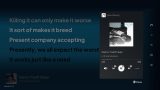
Pick PS5 Connect in the Spotify app and the music plays through the console, and keeps going while you're in a game. It's built on librespot and needs a Spotify Premium account. The first cast signs the console in, and after that you can play music from the console without your phone.
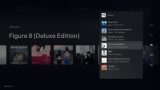
Kabuki, the same developer's control centre, comes in the zip. Hold L3 and R3 for Now Playing with scrubbing, the queue and your library, over a game or the home screen. The receiver also installs a librespot-ps5 app (PPSA99730) into /data/homebrew for albums and playlists, search, liked songs, synced lyrics and Canvas videos. Mount it the way you do your other folder apps.
Load kabuki-ps5.elf first, then librespot-ps5.elf. The receiver won't play without Kabuki. Close the app before you load a newer receiver, and never run two at once. Its files and log are in /data/spotifyps5.
The developer lists firmware 13.20 only. It plays through the console's own music service, and on other firmware it refuses to play until support is added. The author calls it still experimental.
Release notes
v2.0.0 · librespot-ps5 2.0 · Oct 17, 2026
librespot-ps5 2.0: Spotify Connect on a modified PS5, now without the USB drive, with a control centre over your games and an app for your library.
Compatibility
Tested on FW 13.20, other firmware untested. To play over games, the receiver reads a few values from inside the console's own music service, at positions found in the 13.20 version of it. Another firmware can move those around, so before touching anything the receiver checks that the music service matches the one it knows. If it doesn't, it safely refuses to play instead of risking a crash, so it's safe to give it a go on other firmware.
Want your firmware supported? You'll need a PS5 on that firmware with FTP access; see Firmware support and contact me.
Download
Get librespot-ps5-v2.0.0.zip below. It has both programs you need:
kabuki-ps5.elf: Kabuki, the control centre (see its releases).librespot-ps5.elf: the Spotify receiver.
How to use it
- Unzip and put both ELFs on a USB drive (or wherever your payload loader loads from).
- Load
kabuki-ps5.elffirst, thenlibrespot-ps5.elf. - In the Spotify app on your phone, pick PS5 Connect. The first time, this also signs the console in.
- Hold L3 + R3 to open Kabuki: Now Playing (with scrubbing), Queue and Library, over a game or the home screen.
The receiver also installs the librespot-ps5 app (PPSA99730) into /data/homebrew. Mount it like your other folder apps to browse your library, search, and see lyrics and Canvas videos.
If you are coming from a development build, restart the console first.
What's new
- No more USB drive, Streamer track or 14 seconds of silence: the music goes straight to the console's audio.
- Kabuki controls over your game: play/pause, skip, volume, scrubbing, queue and library.
- The librespot-ps5 app: library, albums, playlists, search, liked songs.
- Cast once and the console remembers the login; after that you can play from the console without your phone.
- Synced lyrics. WIP: songs without synced lyrics show Lyrics unavailable.
- Canvas videos, song notifications, correct song when tapping in a playlist on the phone, and better behaved library requests.
Known issues
- Only tested on one console (FW 13.20).
- librespot-ps5 needs Kabuki running; it refuses to play without it.
- Close the librespot-ps5 app before loading a new receiver, and never run two receivers at once.
SHA256SUMS.txt lists the checksums of the ZIP and the files in it. BUILD-INFO.txt records the source revision the receiver was built from. The receiver was built by GitHub Actions from the same source as this release's tag; Kabuki is the unchanged file from its release.
Not affiliated with or endorsed by Spotify or Sony.